OpenVPN & Windows 7

· errors, networking, software, windows

There’s a great GUI out for OpenVPN & Windows, located here.

However, this GUI includes an old OpenVPN, that is no longer compatible with Windows 7 and Windows Vista.

The TUN/TAP driver will be blocked due to compatibility issues, and when trying to connect to a VPN, you’ll get an error along the lines of:

All TAP-Win32 adapters on this system are currently in use

The simplest fix, is to install the GUI package (including the old OpenVPN binaries), and reinstall OpenVPN afterwards.
Turning off Driver Signing in Windows 7

· errors, software

To disable it, as administrator, open cmd.exe (win button + R -> cmd -> [enter]), and copy paste the following 2 lines:

bcdedit.exe -set loadoptions DDISABLE_INTEGRITY_CHECKS bcdedit.exe -set TESTSIGNING ON

Reboot, enjoy. No more annoying messages. :)

Agenda / Todo page

· misc, www

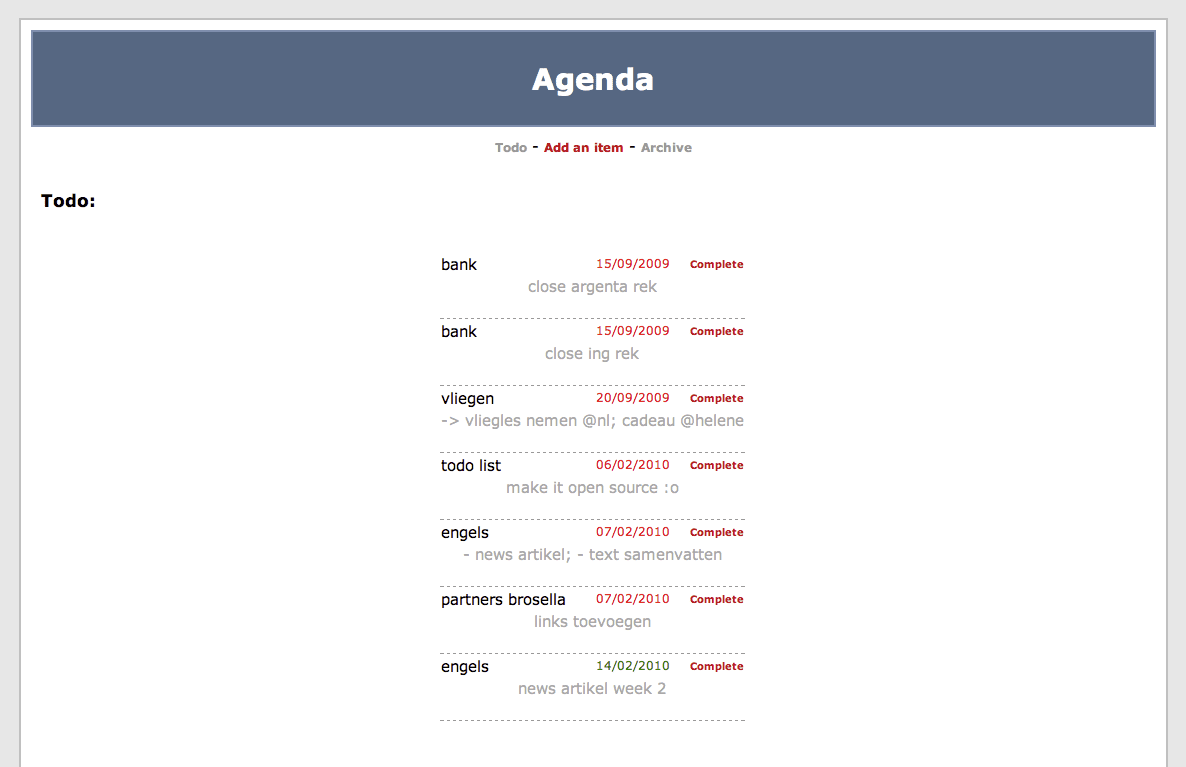
This summer I created a simple “agenda” for myself. I’ve been using it every now & then, but forgot to “share” it. So here it goes.

Screenshots below

Features:

  • Add todo items
  • Change todo items to completed
  • List of (completed) todo items
  • PHP + MySQL
  • Basic Prowl support
  • Example SQL create script
  • There's NO login. Use .htaccess files to disable world wide access.

Screenshots:

iRail new year's bug

· errors, misc, irail, www

Took me a while to notice, but iRail.be was displaying the wrong year by default (2011 instead of 2010) and the NMBS website doesn’t have the 2011 time tables yet. Resulting in errors.

Anyway, fixed!

Aids

· misc

A funny aids prevention movie on YouTube.

<video sadly deleted>

Fraps to iMovie

· apple, software, windows

How to successfully import a movie recorded using Fraps into iMovie;

  1. Get Fraps, record whatever you want
  2. Get XviD4PSP (freeware) & install
  3. Import your avi files recorded using Fraps into XviD4PSP (drag & drop)
  4. Pick the encoding you want on the left. x264 q21 DXVA-SD-Insane seemed to be an acceptable quality.
  5. Click enqueue (and repeat 3->5 for multiple files)
  6. Click encode
  7. ... wait ...
  8. This will create .mp4 files; transfer those to your Mac
  9. Open iMovie, File -> Import -> Movies -> select the mp4 files
  10. ... wait ... A couple of hours
  11. Your movie should now be in iMovie, and you should be able to edit it
  12. Edit whatever you want to edit, share and export and have fun.
A little hint, if your video is cropped (parts cut off), click your movie sequence -> on the left corner of your sequence a little "gear" will appear -> Cropping & Rotation -> in your right display window click "fit" to make it full size.

Took me quite some time before I managed to do it, but hey, now I know… ;)

iTunes 9 and iPhone OS 3

· apple, errors, software

And the smart playlist syncing issue.

Syncing smart playlists, with “live updating” checked, bugged the playlists on the iPhone (there were songs in the playlist that didn’t belong there). Hoping this bug would be fixed ASAP I tried to ignore it as long as possible… However, it so far hasn’t been fixed.

As I was pretty fed up with unchecking “live updating” for 6 playlists eachtime I synced my iPhone, I tried to play around and find a fix.