Linux

126 posts in Linux

Unifi u6+ failing to upgrade

· errors, hardware, linux, networking

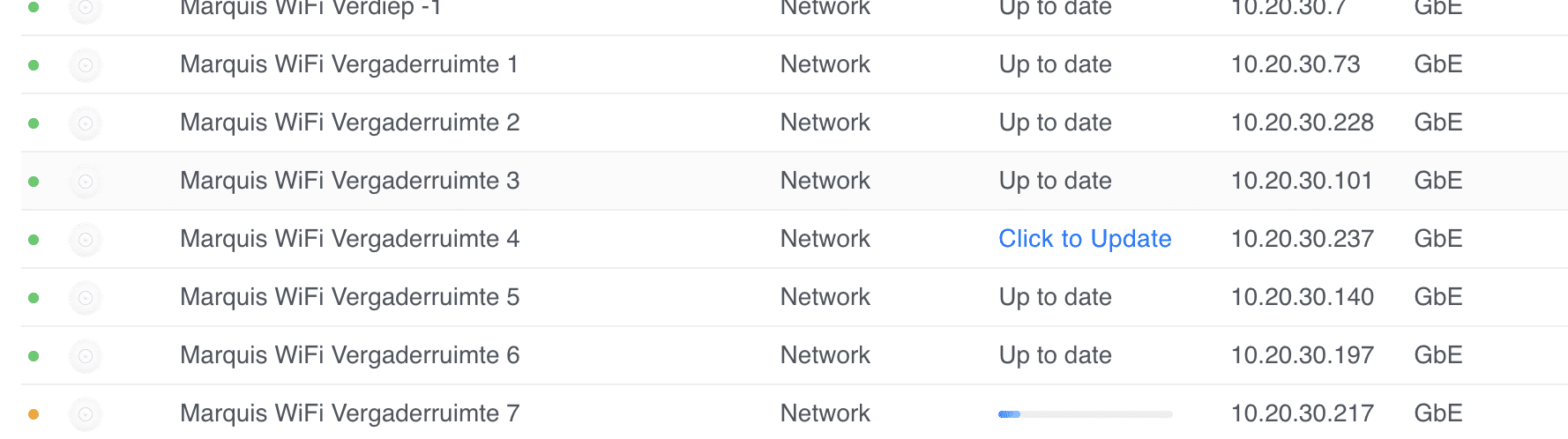
I have quite a few sites where some Unifi U6+ Access Points fail to upgrade with a generic update failed message.

Marquis WiFi Vergaderruimte 4 update failed.

I've tried everything, from ssh'ing, factory resetting with set-default, to manually upgrading with upgrade, etc.

Nothing worked. I thought I had a bunch of bad APs (and many had their warranty expire by a few weeks or months).

As a last resort, I decide to reach out to Ubiquiti's support. First line wasn't very helpful, but as the case was escalated, I've managed to recover and properly update the APs.


GTFS

· linux, software, irail

As iRail's servers go down once in a while (and contain some legacy files, making it a bit messy), I decided to back up and host the GTFS feeds of Belgian Railway (NMBS), and the 3 Belgian bus companies (De Lijn, TEC and MIVB) at gtfs.flatturtle.cloud.

Every night, around 3am (CET), the GTFS files are uploaded to Cloudflare R2.

I keep the historical files as well (iRail only did this for NMBS, but I'm doing it for all). The latest available GTFS is in */_latest/<file>.zip.

WordPress unable to connect to SQL database

· linux, software, www

Yesterday, three blogs I'm hosting suddenly went offline and alerts went off.

They all had the same error that they couldn't connect to their SQL database, and it seemed that the container recently was auto-updated.

Docker logs also showed (which may or may not have been related):

2024-02-21  7:30:29 97 [Warning] Aborted connection 97 to db: 'unconnected' user: 'unauthenticated' host: '192.168.200.4' (This connection closed normally without authentication)

This was odd. I started the usual troubleshooting:

RPi kernels in Bookworm

· hardware, linux, software

Raspberry Pi recently launched Bookworm, and with that, a new kernel package.

However, due to the massive changes from Bullseye to Bookworm, they are not suggesting a dist-upgrade.

In the past, we have suggested procedures for updating an existing image to the new version, but always with the caveat that we do not recommend it, and you do this at your own risk.

This time, because the changes to the underlying architecture are so significant, we are not suggesting any procedure for upgrading a Bullseye image to Bookworm; any attempt to do this will almost certainly end up with a non-booting desktop and data loss.

PoC: Betteruptime + Python-kasa

· hardware, linux, networking, software

Content Update

The provided scripts have been updated on 16 Jul 2023. Specifically the SmartStrip part was not working as intended.


I've been a big fan of Betteruptime. I've started using it to monitor all my assets online (websites, DNS, ping, successful script runs) as well as my servers (using heartbeats).

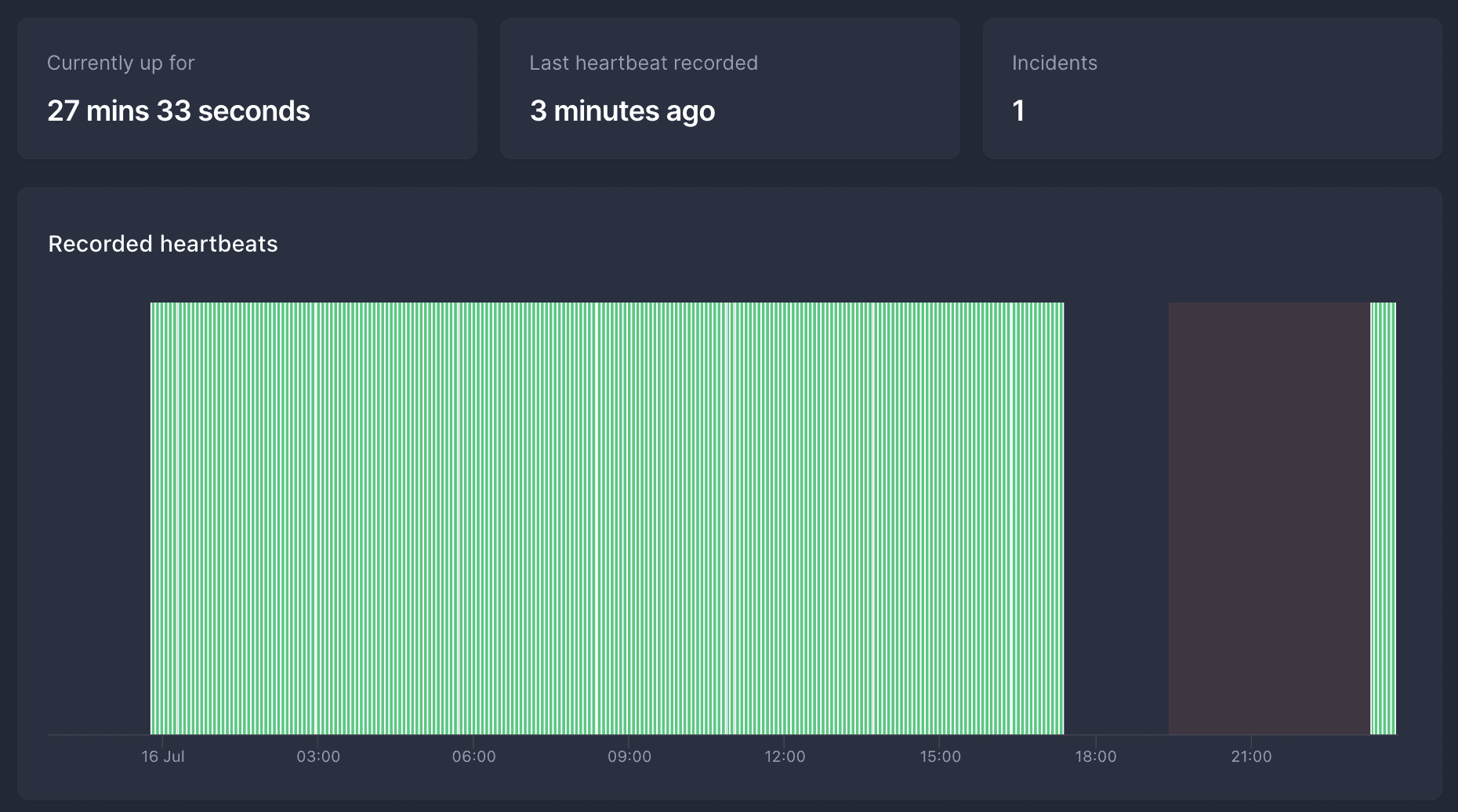
Screenshot of Betteruptime showing a heartbeat that failed for several hours.
Image of a heartbeat that failed for several hours. After 2 hours of no hearbeat, it turned into an incident, and several hours later the heartbeats resumed.

I have a few Raspberry Pi's, and once in a while they hang (not sure why, maybe USB-to-SSD issues or something). Nothing too critical, but annoying.

Bookworm: eth0 -> enX0

· linux, networking, software

Started updating my Debian systems from Bullseye to Bookworm.

The first thing I noticed was that ethX renamed to enXY.

To get back to the old naming scheme, you can fix this by adding the following in /etc/network/interfaces:

rename enX0=eth0
rename enX1=eth1

And reboot.

Allow ping from USG

· linux, networking, software

Because I keep forgetting and it takes me far too much time to go through one of my million sites where I set this up and find the right config...

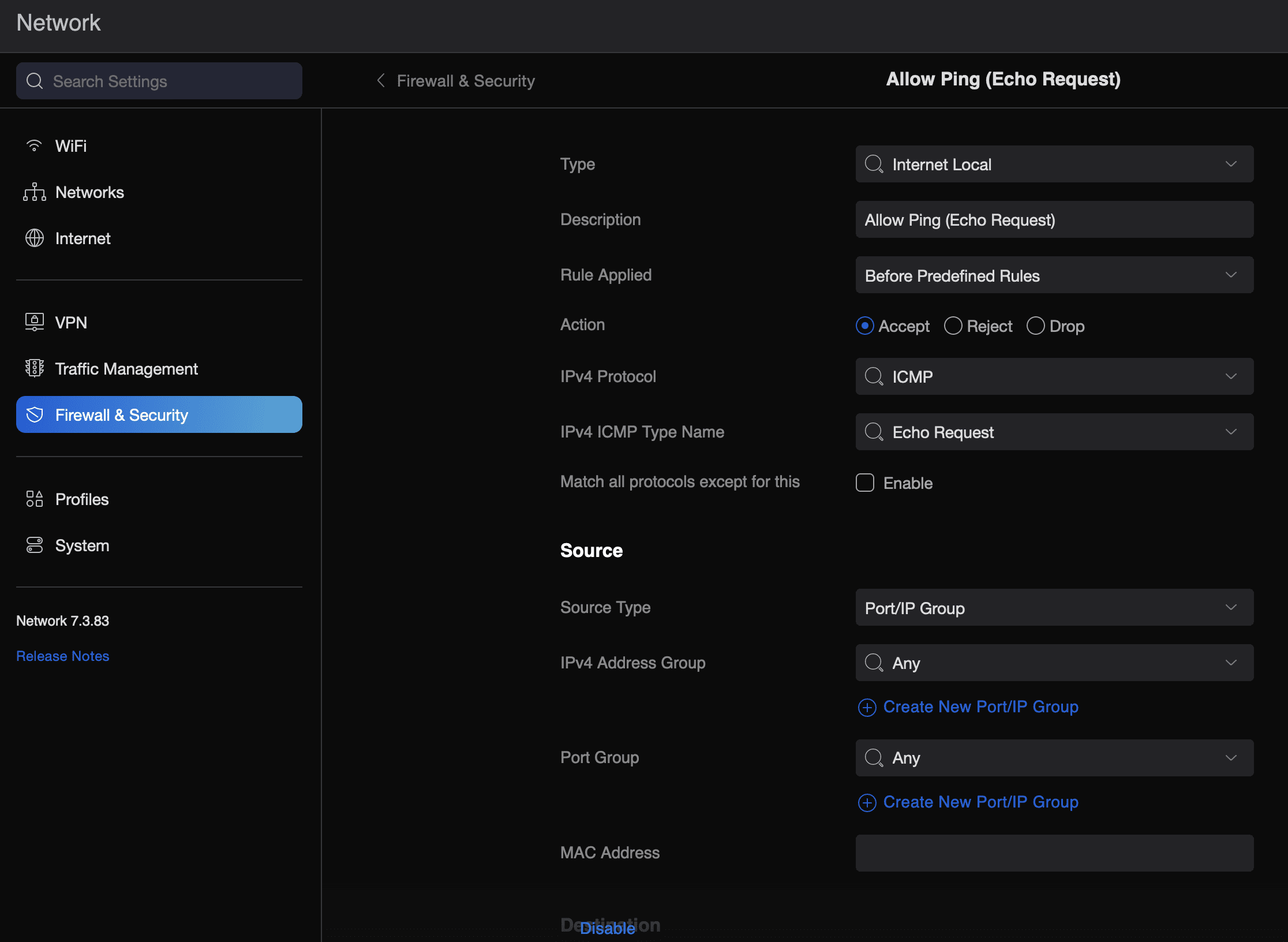
To allow a USG (Unifi Security Gateway) to reply to external (WAN) ping requests, do the following:

  • Head to the Unifi dashboard -> Settings -> Firewall & Security
  • Create a new rule
  • Type: Internet Local
  • Description: Allow Ping (Echo Request)
  • Rule Applied: Before Predefined Rules
  • Action: Accept
  • IPv4 Protocol: ICMP
  • IPv4 IMP Type Name: Echo Request
  • Apply Changes -> wait ~2 minutes

That's it...

NextDNS and NetworkManager

· errors, linux, software

A while back, I wrote about installing NetworkManager if NextDNS activate fails to work.

Only... I realised that for some reason on Raspberry Pi (4), WiFi stopped working with the following errors:

Feb 17 11:55:02 tyr NetworkManager[449]: <info>  [1676631302.2204] device (wlan0): state change: config -> failed (reason 'ssid-not-found', sys-iface-state: 'managed')
Feb 17 11:55:02 tyr NetworkManager[449]: <info>  [1676631302.7525] device (wlan0): set-hw-addr: set MAC address to 92:F3:ED:C2:8F:9B (scanning)
Feb 17 11:55:02 tyr NetworkManager[449]: <warn>  [1676631302.7559] device (wlan0): Activation: failed for connection 'superuser.one'
Feb 17 11:55:02 tyr NetworkManager[449]: <info>  [1676631302.7562] device (wlan0): supplicant interface state: scanning -> disconnected
Feb 17 11:55:02 tyr NetworkManager[449]: <info>  [1676631302.7562] device (p2p-dev-wlan0): supplicant management interface state: scanning -> disconnected
Feb 17 11:55:02 tyr NetworkManager[449]: <info>  [1676631302.7577] device (wlan0): supplicant interface state: disconnected -> interface_disabled
Feb 17 11:55:02 tyr NetworkManager[449]: <info>  [1676631302.7578] device (p2p-dev-wlan0): supplicant management interface state: disconnected -> interface_disabled
Feb 17 11:55:02 tyr NetworkManager[449]: <info>  [1676631302.7579] device (wlan0): supplicant interface state: interface_disabled -> disconnected
Feb 17 11:55:02 tyr NetworkManager[449]: <info>  [1676631302.7579] device (p2p-dev-wlan0): supplicant management interface state: interface_disabled -> disconnected
Feb 17 11:55:02 tyr NetworkManager[449]: <info>  [1676631302.7585] device (wlan0): state change: failed -> disconnected (reason 'none', sys-iface-state: 'managed')

The WiFi SSID and password (wpa_supplicant) never changed, so I wasn't sure what it was. However, as most Pi's are wired I didn't pay much attention, until today.

Mounting a whole disk with partitions

· errors, linux, software

I reinstalled one of my RPis (moving from 32 to 64 bit).

Before doing the full reinstall, I took a dump (dd) of my disk.

Usually, I create one per partition, but this was the Christmas season, and I was half occupied with feasting and half occupied with entertaining Ila. So, mistakes were made.

I ran dd if=/dev/sdb of=backup.img -- but this means I can't mount the disk directly, as it's not a partition:

NetworkManager exit status 1

· errors, linux, software

Recently reinstalled NextDNS on a RPi4 64bit and came across this error:

# nextdns activate
Error: NetworkManager resolver management: exit status 1

It seems like NextDNS was actually running, but just throwing an error when running nextdns activate. Restarting did seem to work without throwing any error.

The logs showed the same error:

Dec 20 14:06:20 tyr nextdns[5753]: Starting NextDNS 1.38.0/linux on :53
Dec 20 14:06:20 tyr nextdns[5753]: Listening on TCP/:53
Dec 20 14:06:20 tyr nextdns[5753]: Starting mDNS discovery
Dec 20 14:06:20 tyr nextdns[5753]: Listening on UDP/:53
Dec 20 14:06:21 tyr nextdns[5753]: Connected 45.90.28.0:443 (con=13ms tls=58ms, TCP, TLS13)
Dec 20 14:06:21 tyr nextdns[5753]: Connected 185.18.148.91:443 (con=12ms tls=28ms, TCP, TLS13)
Dec 20 14:06:21 tyr nextdns[5753]: Switching endpoint: https://dns.nextdns.io#185.18.148.91,2a04:b80:1:30::2
Dec 20 14:06:25 tyr nextdns[5753]: Setting up router
Dec 20 14:06:25 tyr nextdns[5753]: Activating
Dec 20 14:06:25 tyr nextdns[5753]: Activate: NetworkManager resolver management: exit status 1

The solution was (as root):