Posts

Prowl: check server status (using ping)
Yesterday I’ve start using Prowl, as I heard good comments about it. And one of the things I want it to check, are my server statuses. I made a quick script using bash and crontab to check every 10 min if it replies on ping. Per server, I created “host.domain.tld.sh” (e.g. zero.rootspirit.com.sh), and added this in the file:
#!/bin/bash
KEY=YourApiKey
HOST=zero.rootspirit.com
ping -c 1 $HOST   &>/dev/null
if [ $? -ne 0 ] ; then
curl -k -s "https://prowl.weks.net/publicapi/add?apikey=$KEY&application=Server%20Connectivity%20Failure&event=&description=$HOST&priority=2"
fi
Of course, change KEY to your API key, HOST to the IP or DNS of the server it should ping. Also, make sure, that when pinging on your host where you’ll run the bash script on, a non-existing domain actually returns:
iRail issues
Today, I received an e-mail informing iRail was broken, and not showing any information.
The issue has been solved and the site is working again as it should be.
I have no idea for how long the website has been broken, as currently I’m not using any trains to reach my destinations. ;)
Don’t forget to e-mail me if you come across bugs. Much appreciated.
Display iPhone battery status in percent
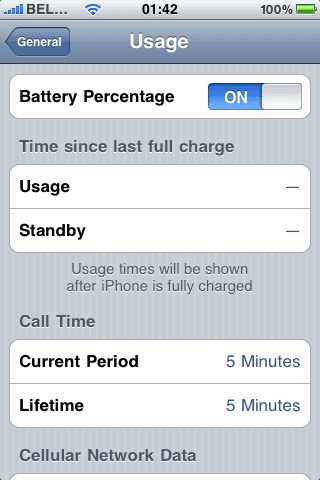
With the new firmware, you can now display your battery status in percent (%).
For my iPhone 3G this came, out of the box, right after the update to 3.0. I could clearly see the 100% next to my battery icon.
But yes, I did have my iPhone jailbroken before I upgraded.
Now, appearantly, this feature is only available for iPhone 3GS, and not iPhone 3G and iPhone 2G, though, it is possible using e.g. Bossprefs. Lame from Apple !
Anyhow, after some Googling, I came to the conclusion:
- iPhones that used to be jailbroken will have the % displayed next to the battery icon.
- Regular iPhone 2G and 3G will not have the switch in "Settings > General > Usage", whereas 3GS will.
I found a cool workaround right here, although it requires you to jailbreak your iPhone.
Don’t forget to install “openssh” and “wget” or “lynx” (makes it a lot easier) using the Cydia package manager.
I’ve hosted the plist file right here, just in case it would go offline.
Basicly, you have to add these 2 lines to the .plist:
   <key>gas-gauge-battery</key>
   <true/>
This works with the current iPhone version (3.0).
Vodafone Mobile Connect - Incorrect Pin code
As I usually use my SIM card in my iPhone, I booted my PC, plugged in the Vodafone USB Mobile Connect modem (HAUWEI 220 or something). I then inserted, with the USB device plugged in, my SIM card, and booted up the Mac (and later on Windows) Vodafone application, to connect my PC to the Proximus 3G network.
This resulted in a constant error; “The pin code was not accepted by the mobile device”.
Tuinslak @ Last.fm
Had to follow the hype, so here we go:
|
|
OpenVPN Linux + Mac howto
A short howto, as I was unable to find any clear ones on the net.
I'm using Mac OS X (Leopard) as client, and a Gentoo server as server/host.
I both tried Viscosity and Tunnelblick on my Mac as OpenVPN software, and Viscosity is probably somewhat easier to configure (using the GUI), it was shareware. So I ended up using Tunnelblick and it seems to be doing its job quite well.
First of all, make sure Gentoo is set up and working as intended. I used my home router as VPN server (having both eth0 and eth1 (= ppp0).
Da Mastah Be Talkin' To Ya

On which he replies:

:)
End of total useless post. ;)

The SysAdmin Ten Commandments
I. Thou shalt respect thy user
It is paramount that you respect the user and their data. Don't steal their MP3s, don't look at their porn. When working with email, look without reading. Respect them and they will respect you.
II. Thou shalt empower the user
The user is the customer. The system is not yours, it is theirs. Provide users the tools they need to be successful and they will be happy. Give them space to experiment, learn and create. Do not hold users back.