Www

118 posts in Www

Compile wget on Mac OS X

· apple, software, www

There's a precompiled wget available on the net, but it's not automatically accepting StartSSL's certificates. And as it seems, there's a wget update available that did.

This is what I had to do to compile it on my Macbook Pro;

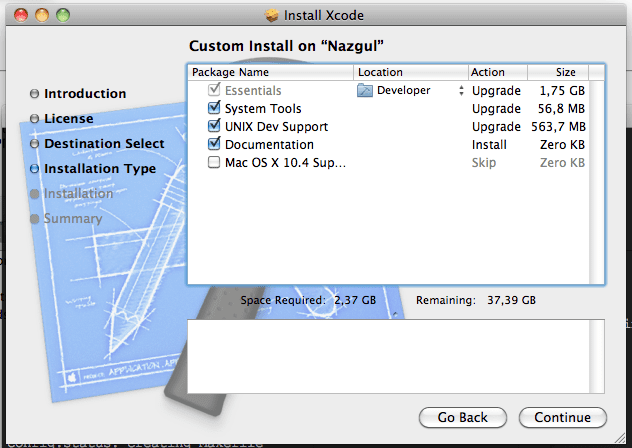
  • Install Xcode, if you haven't, and be sure to select UNIX Dev Support.

Or you'll get this error:

configure: error: C compiler cannot create executables
  • Export Xcode's gcc PATH:
PATH=/Developer/usr/bin/:$PATH
  • Download wget
  • In Terminal: untar it
tar xvzf wget-latest.*
  • And compile it
cd wget directory
./configure
make
sudo make install
  • In case you had an old (precompiled) wget installed;
    remove that version first (/usr/bin/wget probably).
    By default, this one will install itself in /usr/local/bin/wget which should be in your $PATH as well (in case it's not, make a symlink from the old /usr/bin/wget to /usr/local/bin/wget, or recompile with other installation directories).

How to get rid of spambots on WP?

· www

Simple, start using SSL.

Not entirely sure why this keeps spambots away, but a drop from ~100 spam comments/day (1/2) to at most 4 seems pretty cool.

Edit: seems like they just do a POST request to an old URL (http://blog.tuinslak.org/some-post), which results in this reply:

HTTP/1.1 301 Moved Permanently
Server: nginx/0.9.4
Date: Tue, 22 Feb 2011 07:10:24 GMT
Content-Type: text/html
Content-Length: 184
Connection: close
Location: https://blog.tuinslak.org/

I’m guessing once they rescan the new URLs they’ll be spamming again. Just a matter of time for them to update their “bookmarks”. ;)

blog over ssl

· misc, networking, www

Starting a SSL test on this domain as of today. Free cert by StartSSL.

SSL is clearly the new hype, and this time I won’t be last to join it! ;)

Just going to check how much (if any) SSL slows down my site.

Every http requests gets automatically rewritten to https.

nginx: could not build the server_names_hash

· errors, linux, www

I’ve recently started switching my custom nginx installations to the Debian repository version.

So from 0.9.4 to 0.6.32 (Lenny), which will be upgraded to 0.7.x in Squeeze.

I’ve come across this error on certain servers:

# /etc/init.d/nginx restart
Restarting nginx: 2011/02/11 11:34:58 [emerg] 3624#0: could not build the server_names_hash, 
you should increase server_names_hash_bucket_size: 32
nginx.

This can be solved by adding this to the nginx.conf:

Bind mrtg stats

· linux, software, www

Because I couldn’t find any that worked.

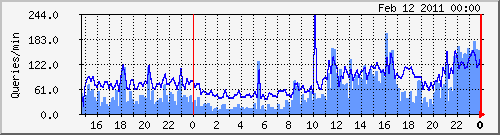
(Dark blue: incoming queries, light blue: outgoing/recursive lookups)

mrtg.cfg sample:
# Bind
Title[bind]: Bind Queries
Target[bind]: `/etc/mrtg/bind-stats.sh`
PageTop[bind]: <H1> Bind queries per minute on vm1 </H1>
Options[bind]: growright,pngdate,nobanner,gauge,nopercent,noinfo
MaxBytes[bind]: 50000
Ylegend[bind]: Queries/min
ShortLegend[bind]:  queries/min
LegendO[bind]: Incoming Bind queries per minute
LegendI[bind]: Outcoing Bind queries per minute
Legend2[bind]: Incoming Bind queries per minute
Legend1[bind]: Outcoing Bind queries per minute
bind-stats.sh:
#!/bin/bash
# Bind MRTG stats
# by Yeri Tiete (Tuinslak) - 10/02/2011
# https://yeri.be
#
# mrtg.cfg sample:
################################################################################
#	#
#	# Bind
#	#
#	Title[bind]: Bind Queries
#	Target[bind]: `/etc/mrtg/bind-stats.sh`
#	PageTop[bind]: <H1> Bind queries per minute on vm1 </H1>
#	Options[bind]: growright,pngdate,nobanner,gauge,nopercent,noinfo
#	MaxBytes[bind]: 50000
#	Ylegend[bind]: Queries/min
#	ShortLegend[bind]:  queries/min
#	LegendO[bind]: Incoming Bind queries per minute
#	LegendI[bind]: Outcoing Bind queries per minute
#	Legend2[bind]: Incoming Bind queries per minute
#	Legend1[bind]: Outcoing Bind queries per minute
################################################################################

file path of named.stats

FILE=/var/log/named.stats TMPFILE=/tmp/__dnsstats.txt

Call to undefined function http_post_data()

· errors, linux, software, www

After updating my server from testing to Squeeze it suddenly crashed after running a high CPU % perl script.

Being unresponsive I reset the machine to reboot it.

After booting up and testing websites running on it I came along an odd PHP error;

Call to undefined function http_post_data()

Probably due to PHP updates from Lenny/testing to Squeeze.

Squid MRTG stats

· hardware, linux, misc, networking, software, www

I talked about MRTG stats for Squid in the past but apparently forgot to include the .mib file.

So, here it is. Download this file and put it in /usr/share/squid/mib.txt.

I don’t quite remember where I found that mib file. Probably included with Squid on Gentoo or the world wide web… But I couldn’t find it on Debian, so here it is. And be sure to add these lines to your Squid config:

MRTG and network interfaces

· hardware, linux, misc, networking, software, www

I tend to restart OpenVPN a lot due to config changes. As a result, this brings quite some issues to MRTG (or more precisely, SNMP), due to the fact tun devices change of ID.

A while back, I found a quick fix for this; rename the interface targets from their respective ID to their name:

Target[eth0]: 2:public@localhost

becomes

Target[eth0]: #eth0:public@localhost
For example:
#
# Eth0 stats
#
Options[eth0]: growright, nobanner, pngdate, nopercent, noinfo
Target[eth0]: #eth0:public@localhost:
SetEnv[eth0]: MRTG_INT_DESCR="eth0"
MaxBytes[eth0]: 1250000
Title[eth0]: Traffic Analysis for deng
PageTop[eth0]: <H1>Traffic Analysis for deng (eth0)</H1>
#
# Eth1 stats
#
Options[eth1]: growright, nobanner, pngdate, nopercent, noinfo
Target[eth1]: #eth1:public@localhost:
SetEnv[eth1]: MRTG_INT_DESCR="eth1"
MaxBytes[eth1]: 1250000
Title[eth1]: Traffic Analysis for deng
PageTop[eth1]: <H1>Traffic Analysis for deng (eth1)</H1>
#
# tun0 stats
#
Options[tun0]: growright, nobanner, pngdate, nopercent, noinfo
Target[tun0]: #tun0:public@localhost:
SetEnv[tun0]: MRTG_INT_DESCR="tun0"
MaxBytes[tun0]: 1250000
Title[tun0]: Traffic Analysis for deng
PageTop[tun0]: <H1>Traffic Analysis for deng (tun0)</H1>
Theme, blog, and stuff

· google, hardware, linux, networking, software, www

As you noticed… Or perhaps didn’t notice, I’ve started using a new, simplistic theme a couple of days ago.

Kinda thought it might be too simplistic (I’ve hidden the sidebar, there’s no search or archive, etc), but I started to, you know, get attached to it.

So it’s here to stay, for a year or something. I guess.

I’ve also noticed that the long load times on my blog were WP_Buzz’s fault. Nice plugin, but 15 to 45 seconds of load time per uncached page wasn’t really worth it. Hope it can be fixed.

Blog changes

· misc, software, www

Right, playing around with my blog again. Wasn’t really that happy anymore with my nginx rproxy caching. Especially that for some reason, lately, every (php) request got at least one hit to the backend Apache server, while it used to cache the generated html for 30 mins.

And well, performance just wasn’t good enough. So I said bye to one.rootspirit.com, and hi to vm1.rootspirit.com a couple of days ago. Vm1 is no longer the nginx proxy, but is hosting my whole blog now. No more Apache for me.