One
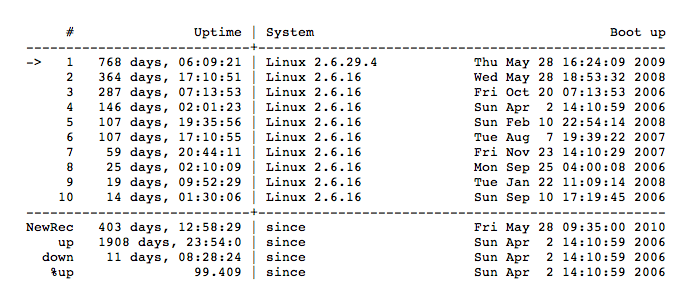
Oh lord. I seem to have entirely forgotten One’s, euh, uptime-day. (Yea, blame my business trips in Beijing & San Francisco for that).
But… Over 2 years! yay
126 posts in Linux
Oh lord. I seem to have entirely forgotten One’s, euh, uptime-day. (Yea, blame my business trips in Beijing & San Francisco for that).
But… Over 2 years! yay
After upgrading my Guruplug Display from Lenny to Squeeze I came along an odd error; every non-root user was unable to access anything related to the internet.
NTP:
Mar 26 20:31:50 localhost ntpd[1055]: ./../lib/isc/unix/ifiter_ioctl.c:348:
unexpected error:
Mar 26 20:31:50 localhost ntpd[1055]: making interface scan socket:
Permission denied
Mar 26 20:35:09 localhost ntpd[1055]: ntpd exiting on signal 15
Regular user:
yeri@gplugD ~ $ ping google.be
ping: unknown host google.be
yeri@gplugD ~ $ ping 85.12.6.171
socket: Permission denied
yeri@gplugD ~ $ ssh localhost
socket: Permission denied
ssh: connect to host localhost port 22: Permission denied
Got this error on my Guruplug Display after messing with it.
Neither was I able to use su, or any other important command.
After many chmods, chowns, and cursing – check your mount (in /etc/fstab) options… ;)
Be sure / is not mounted with
nosetuid
Reboot and enjoy!
An attempt to create a list of major blocked sites in China (or any other country/ISP). It’s written entirely in Bash.
Github repo riiiiiiight here. It’s used by my PAC-generator.
The Github page is updated once a day by three hosts. One in Belgium, one in The Netherlands, and a Guruplug in China. This way you can compare the results (in case some are down or replying slowly).
As it’s impossible to test every possible site, I just check popular sites (and a bunch of sites from Alexa). But if you know blocked sites not in the list, please submit them – thanks!
I made a simple bash script that generates a proxy auto configuration file.
The PAC file generated redirects all matching rules through the proxy.
The only issue at the moment, is that, once the list gets big, it’s not very performance-friendly. Something I’ll try to fix in the coming days.
I’m using this script to generate a proxy.pac file at work to redirect blocked content in China through the proxy for our employees currently in China.
Dropbox has been removed from the Debian package list due to licensing issues.
However, there’s still a way to download and install Dropbox on your Debian box without attempting to compile the source code.
Head over to Linux Mint and download both Dropbox (version 1.0.1) and Nautilus-Dropbox (version 0.6.7-lmde > i386 or amd64).
run:
dpkg -i nautilus-dropbox*
dpkg -i dropbox.*
as root. Then return to your regular user and start dropbox
I’ve recently started switching my custom nginx installations to the Debian repository version.
So from 0.9.4 to 0.6.32 (Lenny), which will be upgraded to 0.7.x in Squeeze.
I’ve come across this error on certain servers:
# /etc/init.d/nginx restart
Restarting nginx: 2011/02/11 11:34:58 [emerg] 3624#0: could not build the server_names_hash,
you should increase server_names_hash_bucket_size: 32
nginx.
This can be solved by adding this to the nginx.conf: