Linux
126 posts in Linux
Bind mrtg stats
Because I couldn’t find any that worked.
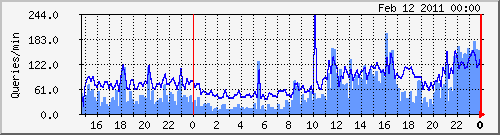
(Dark blue: incoming queries, light blue: outgoing/recursive lookups)
mrtg.cfg sample:# Bind Title[bind]: Bind Queries Target[bind]: `/etc/mrtg/bind-stats.sh` PageTop[bind]: <H1> Bind queries per minute on vm1 </H1> Options[bind]: growright,pngdate,nobanner,gauge,nopercent,noinfo MaxBytes[bind]: 50000 Ylegend[bind]: Queries/min ShortLegend[bind]: queries/min LegendO[bind]: Incoming Bind queries per minute LegendI[bind]: Outcoing Bind queries per minute Legend2[bind]: Incoming Bind queries per minute Legend1[bind]: Outcoing Bind queries per minutebind-stats.sh:
#!/bin/bash # Bind MRTG stats # by Yeri Tiete (Tuinslak) - 10/02/2011 # https://yeri.be # # mrtg.cfg sample: ################################################################################ # # # # Bind # # # Title[bind]: Bind Queries # Target[bind]: `/etc/mrtg/bind-stats.sh` # PageTop[bind]: <H1> Bind queries per minute on vm1 </H1> # Options[bind]: growright,pngdate,nobanner,gauge,nopercent,noinfo # MaxBytes[bind]: 50000 # Ylegend[bind]: Queries/min # ShortLegend[bind]: queries/min # LegendO[bind]: Incoming Bind queries per minute # LegendI[bind]: Outcoing Bind queries per minute # Legend2[bind]: Incoming Bind queries per minute # Legend1[bind]: Outcoing Bind queries per minute ################################################################################file path of named.stats
FILE=/var/log/named.stats TMPFILE=/tmp/__dnsstats.txt
Call to undefined function http_post_data()
After updating my server from testing to Squeeze it suddenly crashed after running a high CPU % perl script.
Being unresponsive I reset the machine to reboot it.
After booting up and testing websites running on it I came along an odd PHP error;
Call to undefined function http_post_data()
Probably due to PHP updates from Lenny/testing to Squeeze.
Squid MRTG stats
I talked about MRTG stats for Squid in the past but apparently forgot to include the .mib file.
So, here it is. Download this file and put it in /usr/share/squid/mib.txt.
I don’t quite remember where I found that mib file. Probably included with Squid on Gentoo or the world wide web… But I couldn’t find it on Debian, so here it is. And be sure to add these lines to your Squid config:
Debian MySQL Gem file error
When installing the MySQL Gem, I had this error:
Building native extensions.  This could take a while...
ERROR:  Error installing mysql:
ERROR: Failed to build gem native extension.
/usr/bin/ruby1.8 extconf.rb --with-mysql-dir=/usr/include/mysql
checking for mysql_query() in -lmysqlclient... no
checking for main() in -lm... yes
checking for mysql_query() in -lmysqlclient... no
checking for main() in -lz... yes
checking for mysql_query() in -lmysqlclient... no
checking for main() in -lsocket... no
checking for mysql_query() in -lmysqlclient... no
checking for main() in -lnsl... yes
checking for mysql_query() in -lmysqlclient... no
checking for main() in -lmygcc... no
checking for mysql_query() in -lmysqlclient... no
*** extconf.rb failed ***
Could not create Makefile due to some reason, probably lack of
necessary libraries and/or headers.  Check the mkmf.log file for more
details.  You may need configuration options.
Provided configuration options:
--with-opt-dir
--without-opt-dir
--with-opt-include
--without-opt-include=${opt-dir}/include
--with-opt-lib
--without-opt-lib=${opt-dir}/lib
--with-make-prog
--without-make-prog
--srcdir=.
--curdir
--ruby=/usr/bin/ruby1.8
--with-mysql-config
--without-mysql-config
--with-mysql-dir
--with-mysql-include
--without-mysql-include=${mysql-dir}/include
--with-mysql-lib
--without-mysql-lib=${mysql-dir}/lib
--with-mysqlclientlib
--without-mysqlclientlib
--with-mlib
--without-mlib
--with-mysqlclientlib
--without-mysqlclientlib
--with-zlib
--without-zlib
--with-mysqlclientlib
--without-mysqlclientlib
--with-socketlib
--without-socketlib
--with-mysqlclientlib
--without-mysqlclientlib
--with-nsllib
--without-nsllib
--with-mysqlclientlib
--without-mysqlclientlib
--with-mygcclib
--without-mygcclib
--with-mysqlclientlib
--without-mysqlclientlib
Gem files will remain installed in /usr/lib/ruby/gems/1.8/gems/mysql-2.8.1 for inspection.
Results logged to /usr/lib/ruby/gems/1.8/gems/mysql-2.8.1/ext/mysql_api/gem_make.out
Can be solved by installing libmysqlclient15-dev
Squid: readable time format in log
Change the time & date log format For Squid.
From: 1295723692.628 24 192.168.200.6 TCP_MISS/200 3505 GET https://web.archive.org/web/20130823023017/http://i3.ytimg.com/vi/ru8ddkzOFUI/default.jpg - DIRECT/74.125.79.101 image/jpeg
To: 22/Jan/2011:20:48:17 +0100.079 40 192.168.200.6 TCP_MISS/304 353 GET https://web.archive.org/web/20110124082452/http://s.ytimg.com/yt/cssbin/www-embed-vfl0GVaH1.css - DIRECT/74.125.79.101 -
In the Squid config comment all “logformat” lines, and add:
logformat squid %tl.%03tu %6tr %>a %Ss/%03Hs %<st %rm %ru %un %Sh/%<A %mt
FYI; Default is:
MRTG and network interfaces
I tend to restart OpenVPN a lot due to config changes. As a result, this brings quite some issues to MRTG (or more precisely, SNMP), due to the fact tun devices change of ID.
A while back, I found a quick fix for this; rename the interface targets from their respective ID to their name:
Target[eth0]: 2:public@localhost
becomes
Target[eth0]: #eth0:public@localhost
#
# Eth0 stats
#
Options[eth0]: growright, nobanner, pngdate, nopercent, noinfo
Target[eth0]: #eth0:public@localhost:
SetEnv[eth0]: MRTG_INT_DESCR="eth0"
MaxBytes[eth0]: 1250000
Title[eth0]: Traffic Analysis for deng
PageTop[eth0]: <H1>Traffic Analysis for deng (eth0)</H1>
#
# Eth1 stats
#
Options[eth1]: growright, nobanner, pngdate, nopercent, noinfo
Target[eth1]: #eth1:public@localhost:
SetEnv[eth1]: MRTG_INT_DESCR="eth1"
MaxBytes[eth1]: 1250000
Title[eth1]: Traffic Analysis for deng
PageTop[eth1]: <H1>Traffic Analysis for deng (eth1)</H1>
#
# tun0 stats
#
Options[tun0]: growright, nobanner, pngdate, nopercent, noinfo
Target[tun0]: #tun0:public@localhost:
SetEnv[tun0]: MRTG_INT_DESCR="tun0"
MaxBytes[tun0]: 1250000
Title[tun0]: Traffic Analysis for deng
PageTop[tun0]: <H1>Traffic Analysis for deng (tun0)</H1>
Theme, blog, and stuff
As you noticed… Or perhaps didn’t notice, I’ve started using a new, simplistic theme a couple of days ago.
Kinda thought it might be too simplistic (I’ve hidden the sidebar, there’s no search or archive, etc), but I started to, you know, get attached to it.
So it’s here to stay, for a year or something. I guess.
I’ve also noticed that the long load times on my blog were WP_Buzz’s fault. Nice plugin, but 15 to 45 seconds of load time per uncached page wasn’t really worth it. Hope it can be fixed.
Zero
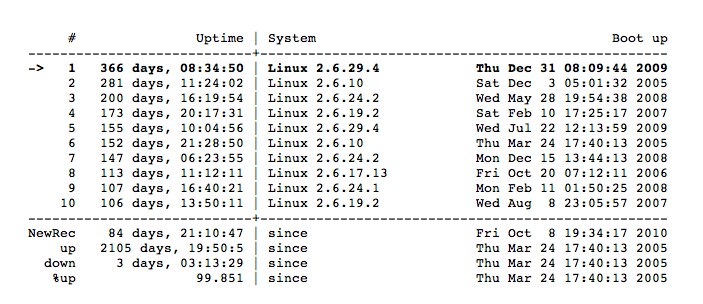
Big grats to good old Zero and its one year uptime! ;)
Xen: iptables issue
vm3:/# iptables -t nat -A PREROUTING -p tcp -m tcp --dport 80 -j DNAT --to-destination 85.12.6.173:8180
WARNING: Could not open 'kernel/net/netfilter/x_tables.ko': No such file or directory
FATAL: Could not open 'kernel/net/ipv4/netfilter/ip_tables.ko': No such file or directory
iptables v1.4.2: can't initialize iptables table `filter': iptables who? (do you need to insmod?)
Perhaps iptables or your kernel needs to be upgraded.
Solution:
vm3:/# depmod
vm3:/# iptables -t nat -A PREROUTING -p tcp -m tcp --dport 80 -j DNAT --to-destination 85.12.6.173:8180
All ok :)