Posts

Theme, blog, and stuff

· Google, Hardware, Linux, Networking, Software, www

As you noticed… Or perhaps didn’t notice, I’ve started using a new, simplistic theme a couple of days ago.

Kinda thought it might be too simplistic (I’ve hidden the sidebar, there’s no search or archive, etc), but I started to, you know, get attached to it.

So it’s here to stay, for a year or something. I guess.

I’ve also noticed that the long load times on my blog were WP_Buzz’s fault. Nice plugin, but 15 to 45 seconds of load time per uncached page wasn’t really worth it. Hope it can be fixed.
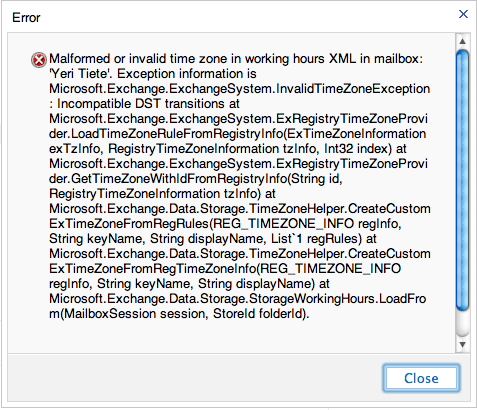
Malformed or invalid time zone in working hours XML in mailbox

· Errors, Misc, Windows

This error might be caused by changing this setting.

When having this error in OWA, ECP or Outlook:

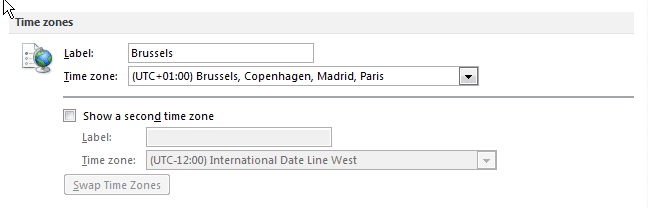
You can fix this by setting the correct time zone in Outlook (you cannot change it through ECP – you need Outlook):

File > Options > Calendar > Time Zone section

Label: YourCity (e.g. Brussels) Time Zone: YourTimeZone (e.g. UTC+1 Brussels).

Be sure to pick the correct time zone and fill in a label.

Changing Outlook (folder) language

· Misc, Windows

In case you started Outlook with say, a Dutch localization, folders like “Inbox” are named “Postvak In”. Idem dito for replies on read receipts (Gelezen ipv Read), or Meeting Requests.

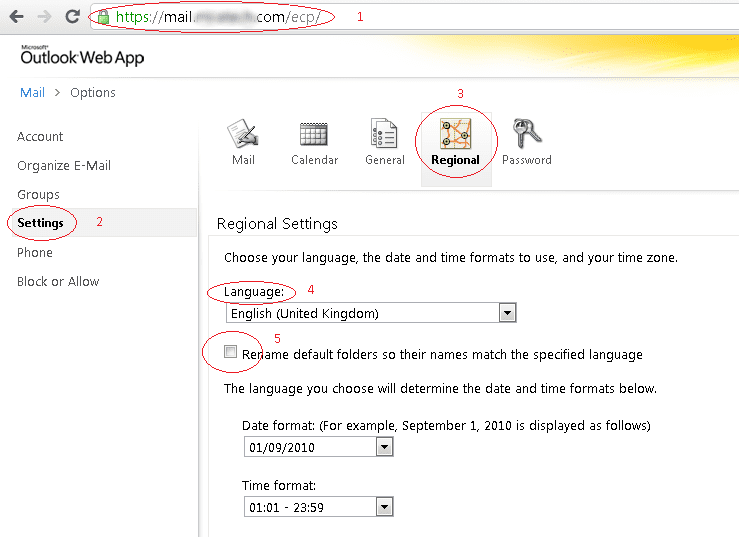
I haven’t found an option to change this within Outlook, but using OWA, you can change the option and rename it.

For example, using the ECP from my company:

Restart Outlook – the problem should be fixed.

Exchange error 0x6d9

· Errors, Software, Windows

I noticed my “Offline Address Book” was no longer automatically updating.

Running “get-offlineaddressbook |fl” in the EMS showed it last updated somewhere 16th November 2010.

Trying to manually update it through EMC (“Organizational Configuration > Mailbox > Offline Address Book > right click Default Offline Address Book > click update”) it gave me this error:

 --------------------------------------------------------
 Microsoft Exchange Error
 --------------------------------------------------------
 Action 'Update' could not be performed on object 'Default Offline Address Book'.
 Default Offline Address Book
 Failed
 Error:
 Failed to generate the content of the offline address book
 '\Default Offline Address Book'.
 Two possible reasons for the failure are that the System Attendant Service is not running or
 you do not have permission to perform this operation. Error message :
 'Error 0x6d9 (There are no more endpoints available from the endpoint mapper) from RpcEpResolveBinding'.
 Error 0x6d9 (There are no more endpoints available from the endpoint mapper) from RpcEpResolveBinding
 --------------------------------------------------------
 OK
 --------------------------------------------------------
 --------------------------------------------------------
 Microsoft Exchange Error
 --------------------------------------------------------
 Action 'Update' could not be performed on object
 'Default Offline Address Book'.
 Default Offline Address BookFailedError:Failed to generate the content of the
 offline address book '\Default Offline Address Book'. Two possible reasons for
 the failure are that the System Attendant Service is not running or you do not
 have permission to perform this operation. Error message :
 'Error 0x6d9 (There are no more endpoints available from the endpoint mapper) from RpcEpResolveBinding'.
 Error 0x6d9 (There are no more endpoints available from the endpoint mapper) from RpcEpResolveBinding
 --------------------------------------------------------
 OK
 --------------------------------------------------------

I googled for quite a while trying to find a fix, but nothing useful could be found.