Munin + Raspberry Pi + temperature
Quick hack to get Munin to graph the cpu temperature.
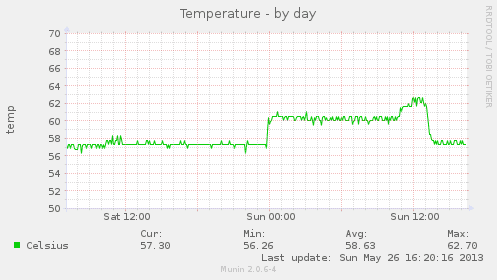
First of all, install Munin and make sure it’s working.
Then follow these steps:
- We’ll use cron to write the current temp to a log file. We do this because I wasn’t able to get Munin to directly execute the command (error:
temp.value VCHI initialization failed)
Execute crontab -e and add this line (this has to be on one line):
*/5 * * * * /opt/vc/bin/vcgencmd measure_temp | cut -d “=” -f2 | cut -d “’” -f1 > /tmp/.temp
- Go to
/etc/munin/plugins/, and create a filetemp, and add this content:
#!/bin/sh
case $1 in
config)
cat <<‘EOM’
graph_category system
graph_title Temperature
graph_vlabel temp
temp.label Celsius
EOM
exit 0;;
esac
echo -n “temp.value "
cat /tmp/.temp
Save and exit the editor.
I’m not sure this is needed, but better do it: chmod +x temp
-
restart munin-node (
/etc/init.d/munin-node restart) -
test if it’s working:
# telnet localhost 4949
Trying 127.0.0.1…
Connected to localhost.
Escape character is ‘^]’.
munin node at industry.yeri.be
fetch temp temp.value 57.3 .
That’s it. Your munin daemon/host should now correctly graph the temperature.
Edit (8/2/2014): updated script can be found here.
[…] temperature from a Raspberry Pi (behind the display, in the […]
[…] got a mail in my inbox about a week ago from Anthony, telling me how to improve my Munin & temp script for a […]
Thanks!!!