Windows

28 posts in Windows

Malformed or invalid time zone in working hours XML in mailbox

· errors, misc, windows

This error might be caused by changing this setting.

When having this error in OWA, ECP or Outlook:
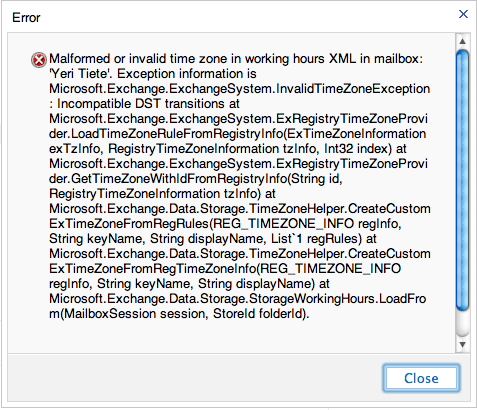
You can fix this by setting the correct time zone in Outlook (you cannot change it through ECP – you need Outlook):

File > Options > Calendar > Time Zone section

Label: YourCity (e.g. Brussels) Time Zone: YourTimeZone (e.g. UTC+1 Brussels).
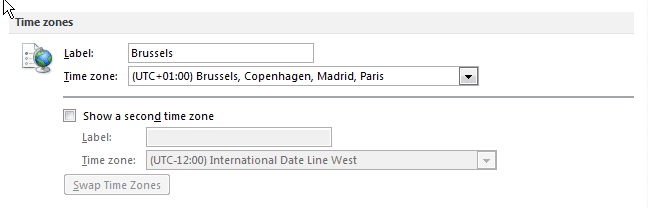
Be sure to pick the correct time zone and fill in a label.
Changing Outlook (folder) language

· misc, windows

In case you started Outlook with say, a Dutch localization, folders like “Inbox” are named “Postvak In”. Idem dito for replies on read receipts (Gelezen ipv Read), or Meeting Requests.

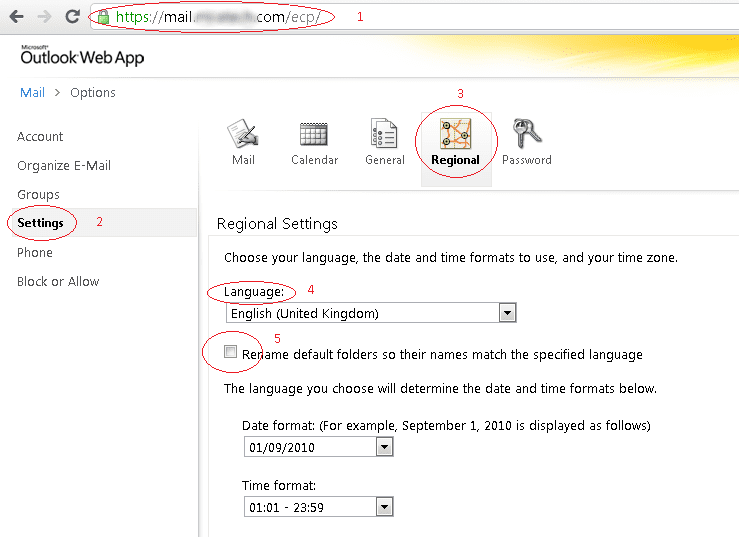
I haven’t found an option to change this within Outlook, but using OWA, you can change the option and rename it.

For example, using the ECP from my company:

Restart Outlook – the problem should be fixed.

Exchange error 0x6d9

· errors, software, windows

I noticed my “Offline Address Book” was no longer automatically updating.

Running “get-offlineaddressbook |fl” in the EMS showed it last updated somewhere 16th November 2010.

Trying to manually update it through EMC (“Organizational Configuration > Mailbox > Offline Address Book > right click Default Offline Address Book > click update”) it gave me this error:

 --------------------------------------------------------
 Microsoft Exchange Error
 --------------------------------------------------------
 Action 'Update' could not be performed on object 'Default Offline Address Book'.
 Default Offline Address Book
 Failed
 Error:
 Failed to generate the content of the offline address book
 '\Default Offline Address Book'.
 Two possible reasons for the failure are that the System Attendant Service is not running or
 you do not have permission to perform this operation. Error message :
 'Error 0x6d9 (There are no more endpoints available from the endpoint mapper) from RpcEpResolveBinding'.
 Error 0x6d9 (There are no more endpoints available from the endpoint mapper) from RpcEpResolveBinding
 --------------------------------------------------------
 OK
 --------------------------------------------------------
 --------------------------------------------------------
 Microsoft Exchange Error
 --------------------------------------------------------
 Action 'Update' could not be performed on object
 'Default Offline Address Book'.
 Default Offline Address BookFailedError:Failed to generate the content of the
 offline address book '\Default Offline Address Book'. Two possible reasons for
 the failure are that the System Attendant Service is not running or you do not
 have permission to perform this operation. Error message :
 'Error 0x6d9 (There are no more endpoints available from the endpoint mapper) from RpcEpResolveBinding'.
 Error 0x6d9 (There are no more endpoints available from the endpoint mapper) from RpcEpResolveBinding
 --------------------------------------------------------
 OK
 --------------------------------------------------------

I googled for quite a while trying to find a fix, but nothing useful could be found.

OpenVPN & Windows 7

· errors, networking, software, windows

There’s a great GUI out for OpenVPN & Windows, located here.

However, this GUI includes an old OpenVPN, that is no longer compatible with Windows 7 and Windows Vista.

The TUN/TAP driver will be blocked due to compatibility issues, and when trying to connect to a VPN, you’ll get an error along the lines of:

All TAP-Win32 adapters on this system are currently in use

The simplest fix, is to install the GUI package (including the old OpenVPN binaries), and reinstall OpenVPN afterwards.

Fraps to iMovie

· apple, software, windows

How to successfully import a movie recorded using Fraps into iMovie;

  1. Get Fraps, record whatever you want
  2. Get XviD4PSP (freeware) & install
  3. Import your avi files recorded using Fraps into XviD4PSP (drag & drop)
  4. Pick the encoding you want on the left. x264 q21 DXVA-SD-Insane seemed to be an acceptable quality.
  5. Click enqueue (and repeat 3->5 for multiple files)
  6. Click encode
  7. ... wait ...
  8. This will create .mp4 files; transfer those to your Mac
  9. Open iMovie, File -> Import -> Movies -> select the mp4 files
  10. ... wait ... A couple of hours
  11. Your movie should now be in iMovie, and you should be able to edit it
  12. Edit whatever you want to edit, share and export and have fun.
A little hint, if your video is cropped (parts cut off), click your movie sequence -> on the left corner of your sequence a little "gear" will appear -> Cropping & Rotation -> in your right display window click "fit" to make it full size.

Took me quite some time before I managed to do it, but hey, now I know… ;)

Windows 7 + iPhone tethering

· networking, windows

If Apple was so kind to give you tethering (and didn’t silently remove it after an update), or if you just happen to have enabled it using, let’s say, the alternative method. And you happen to be forced to use Windows, and you really are tired of XP, and Vista surely isn’t an option; you’re probably running Windows 7.

To enable tethering on the iPhone + Windows; just pair the bluetooth devices (I actually haven’t tried with USB yet, and don’t really plan on doing that), Windows will start to QQ about it being unable to find a suitable driver for the iPhone… I even installed iTunes to see if the message would go away, but apparently it won’t. I’ll have to do some more Googling later on.

Hamachi: Failed to connect to the engine

· errors, software, windows

After getting the Hamachi 2 update (without a prior notice, nicely done… No more auto update if they continue to break stuff) I started to notice a bunch of XPs receiving this error after a reboot: Failed to connect to the engine.

Hamachi is auto started, at boot, because we have a shortcut in the startup folder. No other way to auto start the free version (as far as I know).

HP ProtectTools and Windows 7

· errors, hardware, software, windows

If you’re having troubles using HP ProtectTools and Windows 7, you’ll probably using an outdated version of ProtectTools. Eventhough HP tells you this is the latest version for your notebook.

A simple fix, is to download the latest version, which is model independent.

Be sure to completely uninstall the previous version, reboot, and reinstall the latest version. I can now successfully login using the biometric fingerprint device.