Networking

110 posts in Networking

Great Firewall checker

· Linux, Networking, Software, www

An attempt to create a list of major blocked sites in China (or any other country/ISP). It’s written entirely in Bash.

Github repo riiiiiiight here. It’s used by my PAC-generator.

The Github page is updated once a day by three hosts. One in Belgium, one in The Netherlands, and a Guruplug in China. This way you can compare the results (in case some are down or replying slowly).

As it’s impossible to test every possible site, I just check popular sites (and a bunch of sites from Alexa). But if you know blocked sites not in the list, please submit them – thanks!

Proxy.pac generator

· Linux, Networking, Software, www

I made a simple bash script that generates a proxy auto configuration file.

The PAC file generated redirects all matching rules through the proxy.

The only issue at the moment, is that, once the list gets big, it’s not very performance-friendly. Something I’ll try to fix in the coming days.

I’m using this script to generate a proxy.pac file at work to redirect blocked content in China through the proxy for our employees currently in China.

blog over ssl

· Misc, Networking, www

Starting a SSL test on this domain as of today. Free cert by StartSSL.

SSL is clearly the new hype, and this time I won’t be last to join it! ;)

Just going to check how much (if any) SSL slows down my site.

Every http requests gets automatically rewritten to https.

Squid MRTG stats

· Hardware, Linux, Misc, Networking, Software, www

I talked about MRTG stats for Squid in the past but apparently forgot to include the .mib file.

So, here it is. Download this file and put it in /usr/share/squid/mib.txt.

I don’t quite remember where I found that mib file. Probably included with Squid on Gentoo or the world wide web… But I couldn’t find it on Debian, so here it is. And be sure to add these lines to your Squid config:

MRTG and network interfaces

· Hardware, Linux, Misc, Networking, Software, www

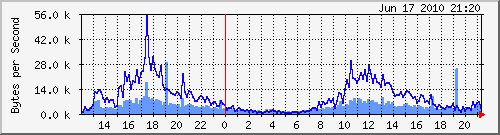
I tend to restart OpenVPN a lot due to config changes. As a result, this brings quite some issues to MRTG (or more precisely, SNMP), due to the fact tun devices change of ID.

A while back, I found a quick fix for this; rename the interface targets from their respective ID to their name:

Target[eth0]: 2:public@localhost

becomes

Target[eth0]: #eth0:public@localhost
For example:
#
# Eth0 stats
#
Options[eth0]: growright, nobanner, pngdate, nopercent, noinfo
Target[eth0]: #eth0:public@localhost:
SetEnv[eth0]: MRTG_INT_DESCR="eth0"
MaxBytes[eth0]: 1250000
Title[eth0]: Traffic Analysis for deng
PageTop[eth0]: <H1>Traffic Analysis for deng (eth0)</H1>
#
# Eth1 stats
#
Options[eth1]: growright, nobanner, pngdate, nopercent, noinfo
Target[eth1]: #eth1:public@localhost:
SetEnv[eth1]: MRTG_INT_DESCR="eth1"
MaxBytes[eth1]: 1250000
Title[eth1]: Traffic Analysis for deng
PageTop[eth1]: <H1>Traffic Analysis for deng (eth1)</H1>
#
# tun0 stats
#
Options[tun0]: growright, nobanner, pngdate, nopercent, noinfo
Target[tun0]: #tun0:public@localhost:
SetEnv[tun0]: MRTG_INT_DESCR="tun0"
MaxBytes[tun0]: 1250000
Title[tun0]: Traffic Analysis for deng
PageTop[tun0]: <H1>Traffic Analysis for deng (tun0)</H1>
Theme, blog, and stuff

· Google, Hardware, Linux, Networking, Software, www

As you noticed… Or perhaps didn’t notice, I’ve started using a new, simplistic theme a couple of days ago.

Kinda thought it might be too simplistic (I’ve hidden the sidebar, there’s no search or archive, etc), but I started to, you know, get attached to it.

So it’s here to stay, for a year or something. I guess.

I’ve also noticed that the long load times on my blog were WP_Buzz’s fault. Nice plugin, but 15 to 45 seconds of load time per uncached page wasn’t really worth it. Hope it can be fixed.

nginx reverse proxy with caching

· Linux, Networking, Software, www

Playing around and searching the web I enabled some decent caching now.

Here are some stats: image+html and php. Note that the php on apache (recompiled each request, about 1.5-2sec between every request) versus the cached output has a huge difference. Difference between images and static text files aren’t that huge. Also note that nginx has gzip enabled. The downside is that nginx caches all pages (HTTP code 200) for one hour and isn’t notified when pages are modified (yet).

nginx reverse proxy IP

· Linux, Networking, Software, www

The issue with the wrong IP address being shown when using nginx as reverse proxy can easily be solved with mod_rpaf.

cache.blog.tuinslak.org 85.234.196.237 - - [22/May/2010:16:33:46 +0200] "GET /2010/05/nginx-reverse-proxy/ HTTP/1.0" 200 6184 "-" "Mozilla/5.0 (Macintosh; U; Intel Mac OS X 10_6_3; en-US) AppleWebKit/533.4 (KHTML, like Gecko) Chrome/5.0.375.53 Safari/533.4" 1766 6503

vs

cache.blog.tuinslak.org 85.12.6.171 - - [22/May/2010:16:27:40 +0200] “GET /2010/05/nginx-reverse-proxy/ HTTP/1.0” 200 22639 “-” “Mozilla/5.0 (Macintosh; U; Intel Mac OS X 10_6_3; en-US) AppleWebKit/533.4 (KHTML, like Gecko) Chrome/5.0.375.53 Safari/533.4” 1771 23031

nginx reverse proxy

· Linux, Networking, Software, www

I’ve been playing around a bit with nginx and its reverse proxy module. The “real” website is accessible here, whereas the cached version is here.

I’m deliberately making a difference between cache.* and live.* as blog.tuinslak.* might move to the cached version lateron.

The question, is it useful to reverse proxy this blog? No, probably not. But meh… It’s fun. :)

IP differences between both versions: live vs cache°. I’m guessing as most of the stats (Google Analytics and WP Stats) are JavaScript based, all stats should still be correctly generated. Only the Apache logs show the nginx proxy IP address. Which is normal, I guess.