Misc
1053 posts in Misc
MRTG and network interfaces
I tend to restart OpenVPN a lot due to config changes. As a result, this brings quite some issues to MRTG (or more precisely, SNMP), due to the fact tun devices change of ID.
A while back, I found a quick fix for this; rename the interface targets from their respective ID to their name:
Target[eth0]: 2:public@localhost
becomes
Target[eth0]: #eth0:public@localhost
#
# Eth0 stats
#
Options[eth0]: growright, nobanner, pngdate, nopercent, noinfo
Target[eth0]: #eth0:public@localhost:
SetEnv[eth0]: MRTG_INT_DESCR="eth0"
MaxBytes[eth0]: 1250000
Title[eth0]: Traffic Analysis for deng
PageTop[eth0]: <H1>Traffic Analysis for deng (eth0)</H1>
#
# Eth1 stats
#
Options[eth1]: growright, nobanner, pngdate, nopercent, noinfo
Target[eth1]: #eth1:public@localhost:
SetEnv[eth1]: MRTG_INT_DESCR="eth1"
MaxBytes[eth1]: 1250000
Title[eth1]: Traffic Analysis for deng
PageTop[eth1]: <H1>Traffic Analysis for deng (eth1)</H1>
#
# tun0 stats
#
Options[tun0]: growright, nobanner, pngdate, nopercent, noinfo
Target[tun0]: #tun0:public@localhost:
SetEnv[tun0]: MRTG_INT_DESCR="tun0"
MaxBytes[tun0]: 1250000
Title[tun0]: Traffic Analysis for deng
PageTop[tun0]: <H1>Traffic Analysis for deng (tun0)</H1>
B-Ju – Soja Extra (Benny B. Blonco Remix)
B-Ju - Soja Extra (Benny B. Blonco Remix) by Error Broadcast
Awesome song I found out a few days ago. Can't stop listening to it :D
Malformed or invalid time zone in working hours XML in mailbox
This error might be caused by changing this setting.
When having this error in OWA, ECP or Outlook:
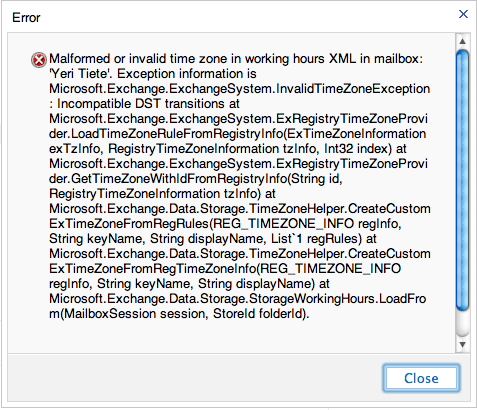
You can fix this by setting the correct time zone in Outlook (you cannot change it through ECP – you need Outlook):
File > Options > Calendar > Time Zone section
Label: YourCity (e.g. Brussels) Time Zone: YourTimeZone (e.g. UTC+1 Brussels).
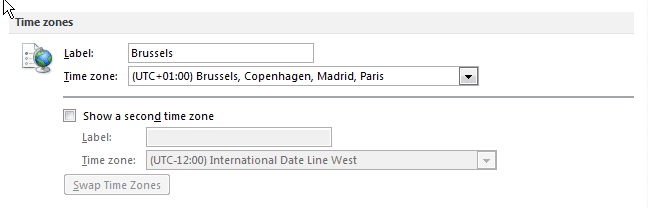
Be sure to pick the correct time zone and fill in a label.
Changing Outlook (folder) language
In case you started Outlook with say, a Dutch localization, folders like “Inbox” are named “Postvak In”. Idem dito for replies on read receipts (Gelezen ipv Read), or Meeting Requests.
I haven’t found an option to change this within Outlook, but using OWA, you can change the option and rename it.
For example, using the ECP from my company:
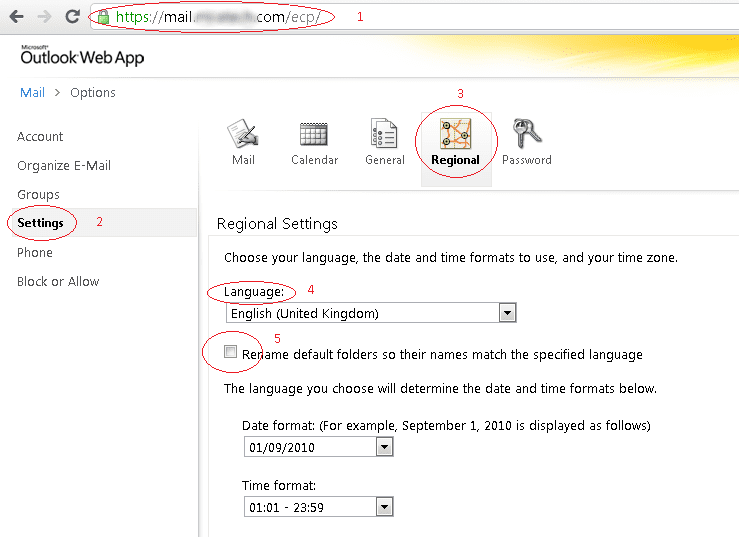
Restart Outlook – the problem should be fixed.