#Mrtg

5 posts tagged Mrtg

Bind mrtg stats

· linux, software, www

Because I couldn’t find any that worked.
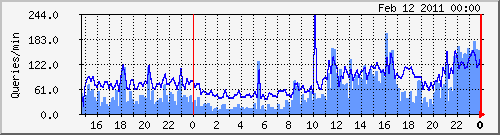
(Dark blue: incoming queries, light blue: outgoing/recursive lookups)

mrtg.cfg sample:
# Bind
Title[bind]: Bind Queries
Target[bind]: `/etc/mrtg/bind-stats.sh`
PageTop[bind]: <H1> Bind queries per minute on vm1 </H1>
Options[bind]: growright,pngdate,nobanner,gauge,nopercent,noinfo
MaxBytes[bind]: 50000
Ylegend[bind]: Queries/min
ShortLegend[bind]:  queries/min
LegendO[bind]: Incoming Bind queries per minute
LegendI[bind]: Outcoing Bind queries per minute
Legend2[bind]: Incoming Bind queries per minute
Legend1[bind]: Outcoing Bind queries per minute
bind-stats.sh:
#!/bin/bash
# Bind MRTG stats
# by Yeri Tiete (Tuinslak) - 10/02/2011
# https://yeri.be
#
# mrtg.cfg sample:
################################################################################
#	#
#	# Bind
#	#
#	Title[bind]: Bind Queries
#	Target[bind]: `/etc/mrtg/bind-stats.sh`
#	PageTop[bind]: <H1> Bind queries per minute on vm1 </H1>
#	Options[bind]: growright,pngdate,nobanner,gauge,nopercent,noinfo
#	MaxBytes[bind]: 50000
#	Ylegend[bind]: Queries/min
#	ShortLegend[bind]:  queries/min
#	LegendO[bind]: Incoming Bind queries per minute
#	LegendI[bind]: Outcoing Bind queries per minute
#	Legend2[bind]: Incoming Bind queries per minute
#	Legend1[bind]: Outcoing Bind queries per minute
################################################################################

file path of named.stats

FILE=/var/log/named.stats TMPFILE=/tmp/__dnsstats.txt
Squid MRTG stats

· hardware, linux, misc, networking, software, www

I talked about MRTG stats for Squid in the past but apparently forgot to include the .mib file.

So, here it is. Download this file and put it in /usr/share/squid/mib.txt.

I don’t quite remember where I found that mib file. Probably included with Squid on Gentoo or the world wide web… But I couldn’t find it on Debian, so here it is. And be sure to add these lines to your Squid config:

MRTG and network interfaces

· hardware, linux, misc, networking, software, www

I tend to restart OpenVPN a lot due to config changes. As a result, this brings quite some issues to MRTG (or more precisely, SNMP), due to the fact tun devices change of ID.

A while back, I found a quick fix for this; rename the interface targets from their respective ID to their name:

Target[eth0]: 2:public@localhost

becomes

Target[eth0]: #eth0:public@localhost
For example:
#
# Eth0 stats
#
Options[eth0]: growright, nobanner, pngdate, nopercent, noinfo
Target[eth0]: #eth0:public@localhost:
SetEnv[eth0]: MRTG_INT_DESCR="eth0"
MaxBytes[eth0]: 1250000
Title[eth0]: Traffic Analysis for deng
PageTop[eth0]: <H1>Traffic Analysis for deng (eth0)</H1>
#
# Eth1 stats
#
Options[eth1]: growright, nobanner, pngdate, nopercent, noinfo
Target[eth1]: #eth1:public@localhost:
SetEnv[eth1]: MRTG_INT_DESCR="eth1"
MaxBytes[eth1]: 1250000
Title[eth1]: Traffic Analysis for deng
PageTop[eth1]: <H1>Traffic Analysis for deng (eth1)</H1>
#
# tun0 stats
#
Options[tun0]: growright, nobanner, pngdate, nopercent, noinfo
Target[tun0]: #tun0:public@localhost:
SetEnv[tun0]: MRTG_INT_DESCR="tun0"
MaxBytes[tun0]: 1250000
Title[tun0]: Traffic Analysis for deng
PageTop[tun0]: <H1>Traffic Analysis for deng (tun0)</H1>

MRTG

· hardware, misc, networking, software, www

As I often have people asking for the files I use to make my pretty MRTG graphs; I’ll publish them here.

Here are some examples:

Zero - One - Four - vm1 - Sauron

The config files:

Sauron (including Squid stats),

Zero (including fan stats).

List of files included:

  • indexmaker; simple script (included with MRTG) to generate a simple index file with all the graphs
  • snmp-if.sh; will show you the IDs of the interfaces on the server/pc. These IDs have to be edited in the mrtg.cfg file; e.g.:

Target[eth0]: 2:public@localhost: