Posts
Eurostar.com sitemap links to spam site...
The Eurostar.com (cached copy) sitemap links to an odd directory: eurostar.com/bestkeptsecret (which was part of a viral campaign in 2006, Google tells me), which in turn redirects to a spam site… :(
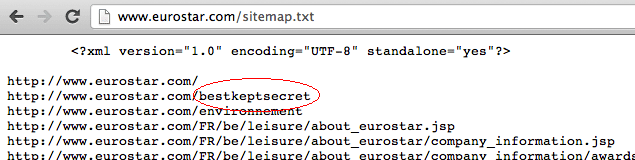
Visiting that links redirect to a spammy website about real estate… Please clean up your shit -.-)
HTTP headers when getting eurostar.com/bestkeptsecret:
HTTP/1.1 301 Moved Permanently
Content-Length: 245
Date: Sat, 29 Dec 2012 22:14:39 GMT
Server: Apache
Location: https://web.archive.org/web/20190118192808/http://www.europesbestkeptsecret.com/
Vary: Accept-Encoding
Connection: close
Content-Type: text/html; charset=iso-8859-1
<!DOCTYPE HTML PUBLIC "-//IETF//DTD HTML 2.0//EN">
<html><head>
<title>301 Moved Permanently</title>
</head><body>
<h1>Moved Permanently</h1>
<p>The document has moved <a href="http://www.europesbestkeptsecret.com/">here</a>.</p>
</body></html>
To a successful New Year !
May we all get what we deserve want. ;)
Random reboots of Galaxy Nexus
Since I moved to Antwerp, in a high building apparently made out of the thickest steel they could find (> My wifi signal barely passes the internal walls, and I’m pretty much unable to make a decent cell phone call) my Galaxy Nexus has been behaving oddly.
It started during the night of the press conf when I was catching up on my mails when I got home of a whiskey tasting evening/“apps for whiskey” event.
Android 4.1 IMAP + stock mail bug
On 4.1 (yes, I’m lagging behind with my blog posts) something rather funky happened. And it took my 7 days to notice.
My phone was running hotter and battery life was suddenly crappier than usual. But not really paying attention, until my cell provider (Proximus) texted me I was over my data consumption limit…
As it was the beginning of the month, so that was unusual. I checked data usage in settings, and noticed ~7Gb of traffic by mail app over WiFi and ~3Gb over mobile data.
Mac OS X Mountain Lion: unable to add printers
Okay. This one took a long time to solve.
At some random point after upgrading from Snow Leopard to Mountain Lion was unable to add new printers.
As I don’t really add new printers on a daily base, I have no idea when it actually happened or what might have caused it.
- If I deleted an existing printer, and tried to readd it, it would throw errors at me.
- Plugging in (known) printers would pop up the dialog "click here to install/download/search for the printer driver", even though it was installed. Clicking install would give me an error no drivers could be found.
- Dymo Labelwriter shizzle stopped working.
- The driver list (system pref > printers > add > select printer software) would be empty, while on another Mac it was fully populated.
- Mac would never find the printer driver for the printer, requiring manual intervention (but, yea, as the list was empty, there wasn't much to select).
This is, as you might guess, quite annoying. Unable to print any new labels or print out any papers (and invoices ! -.-) ) I had to use another Mac just for printing.
Nothing to hide...
Worth a read.