Linux

126 posts in Linux

OpenVPN Linux + Mac howto

· apple, linux, networking

A short howto, as I was unable to find any clear ones on the net.

I'm using Mac OS X (Leopard) as client, and a Gentoo server as server/host.

I both tried Viscosity and Tunnelblick on my Mac as OpenVPN software, and Viscosity is probably somewhat easier to configure (using the GUI), it was shareware. So I ended up using Tunnelblick and it seems to be doing its job quite well.

First of all, make sure Gentoo is set up and working as intended. I used my home router as VPN server (having both eth0 and eth1 (= ppp0).
Imap/Gmail mark as read

· errors, linux, misc, networking, software

I’ve “updated” my previous php-app.

Since today I ended up getting this error:

Warning: imap_open(): Couldn't open stream {imap.gmail.com:993/imap/ssl}[Google Mail]/Spam in /home/yeri/.gmail.php on line 30
Certificate failure for imap.gmail.com: unable to get local issuer certificate: /C=US/ST=California/L=Mountain View/O=Google Inc/CN=imap.gmail.com - Connection failed.

Simply searching this line:

$open = imap_open ("{imap.gmail.com:993/imap/ssl/}$path"

And editing it to:

$open = imap_open ("{imap.gmail.com:993/imap/ssl/novalidate-cert}$path"

Solves the problem.

This will ignore the Google certificate. Please do double check that imap.google.com really points to Google, and it’s not some kind of DNS issue.

Gmail automatic "mark (spam) as read"

· errors, linux, misc, networking, software

I hate having unread mail. I hate having spam. And most of all, I hate spam that asks for attention.

When receiving spam in Gmail, you get the annoying bold Spam (12353434) with ‘12353434’ being the number of unread spam messages.

With the introduction of Gmail Labs I’d hope to see an “automaticly mark spam message as seen” feature, which, well, I haven’t found yet.

Being tired of all these increasing spam numbers, and my daily efforts to “select all unread + mark as read”, I ended up writing a small PHP file which connects to the Gmail (using IMAP, so I asume you’ll need IMAP enabled in your settings..) and marks all spam messages as read. Running this script locally with a curl or cron every X time will solve most of your problems, I hope.

Rsync backups

· apple, linux, software

My own simple rsync backup ‘script’.

You’ll need a rsync server, something to backup, and ssh-agent running to ease the process (or, fill in your password each time).

Add the following lines (using a terminal text editor) to a text file (".rsync" for example, hidden files under Unix-like systems), and chmod +x $file.

rsync --archive -uv --exclude-from=/home/you/.rsync_exclude \
--rsh="ssh -p 222" --delete --stats --progress /Users/you/Documents/ \
you@remost.host.com:/home/you/remote-backup-directory

This will upload any files in /Users/you/Documents to /home/you/remote-backup-directory.

Multiple Memory Access Vulnerabilities Linux Kernel

· errors, linux

Well, it had to happen…

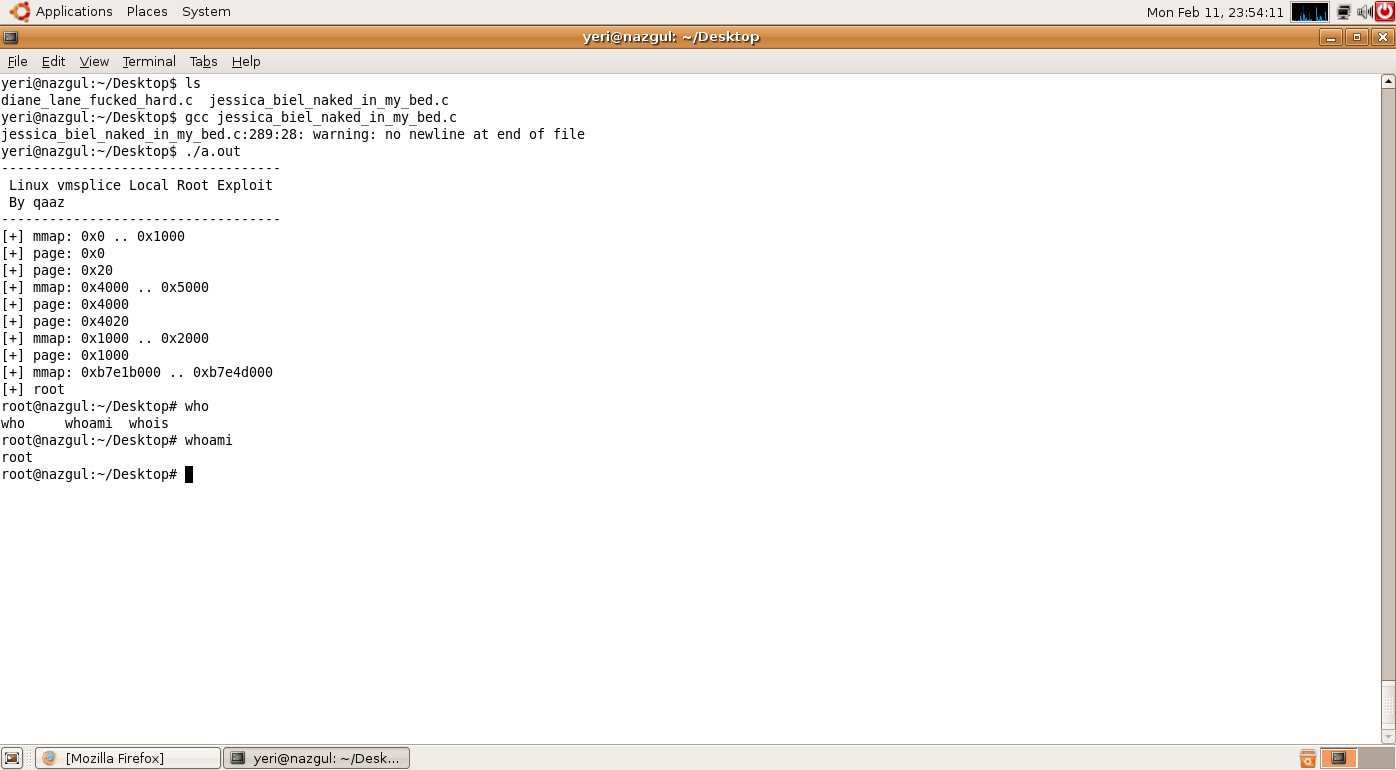
Yesterday evening two of our linux boxes were exploited. I had to try it out for myself; and yes, it really does work. :| Booted up my Ubuntu in Parallels, installed build-essential & ran that program!

sudo apt-get install build-essential
gcc what-ever-the-file-name-is.c
./a.out

This is what it looks like:

Kernel exploit

My-oh-my… I’m pretty sure this doesn’t require any more explanations ;)

Parallels + Ubuntu

· apple, linux, virtualisation

I finally got a reply from the Parallels support team. After using the alternate Parallels installer it finally works again! Even after rebooting Mac! joy

Before trying to run Vista/Bootcamp through Parallels again, I’m waiting till the end of my exams (Thursday). Don’t want to blow up my Windows install again when I’m in desperate need of it. ;)

As usual with Parallels, creating/installing a new OS isn’t easy. Wether it crashes or you get a bunch of errors, you’re always up for a day full of fun!