February 2008
17 posts
Hamachi(X) on Leopard
When playing with KisMAC, I noticed something weird in my /var/log/system.log;
$date com.apple.launchd[1] (tuncfgd$pid) posix_spawnp("/usr/sbin/tuncfg", ...):
No such file or directory
$date com.apple.launchd[1] (tuncfgd$pid) Exited with exit code: 1
$date com.apple.launchd[1] (tuncfgd) Throttling respawn: Will start in 10 seconds
tun is (trying) to restart every 10 (!) seconds. I tried updating Hamachi’s tun/tap drivers, without any success. It kept restarting the process every 10 seconds.
After a bit of Googling, it seemed to be a known problem. So I decided to uninstall Hamachi & the tun/tap drivers.

Valentine
Well, it’s that time of the year again. Time to be nice to all people you know (or was that Xmas?)
Quote of the Year:
[Guild] [Massacre]: The bitch told me to stop wow-ing for valentine, I told her to fuck off.
Ahhh, what a great initiative, that valentine’s day!
Anyhow, happy valentine’s day, Helene!
Mac OS X.5.2
Yes, it’s here, finally!
A 355 Mb patch, downloaded over poor UMTS/3G at school and in the train… Took a while, but it’s finally installed.
Some nice few features, like the fact you can now remove the semi-transparent effect on the menu bar (makes it nicer). They also added some nice stacks enhancements.
A Time Machine icon is added in the menu bar too, just too bad you can’t make it just pop-up when it is actually backing up. I like keeping my menu bar clean. ;)
Multiple Memory Access Vulnerabilities Linux Kernel
Well, it had to happen…
Yesterday evening two of our linux boxes were exploited. I had to try it out for myself; and yes, it really does work. :| Booted up my Ubuntu in Parallels, installed build-essential & ran that program!
sudo apt-get install build-essential
gcc what-ever-the-file-name-is.c
./a.out
This is what it looks like:
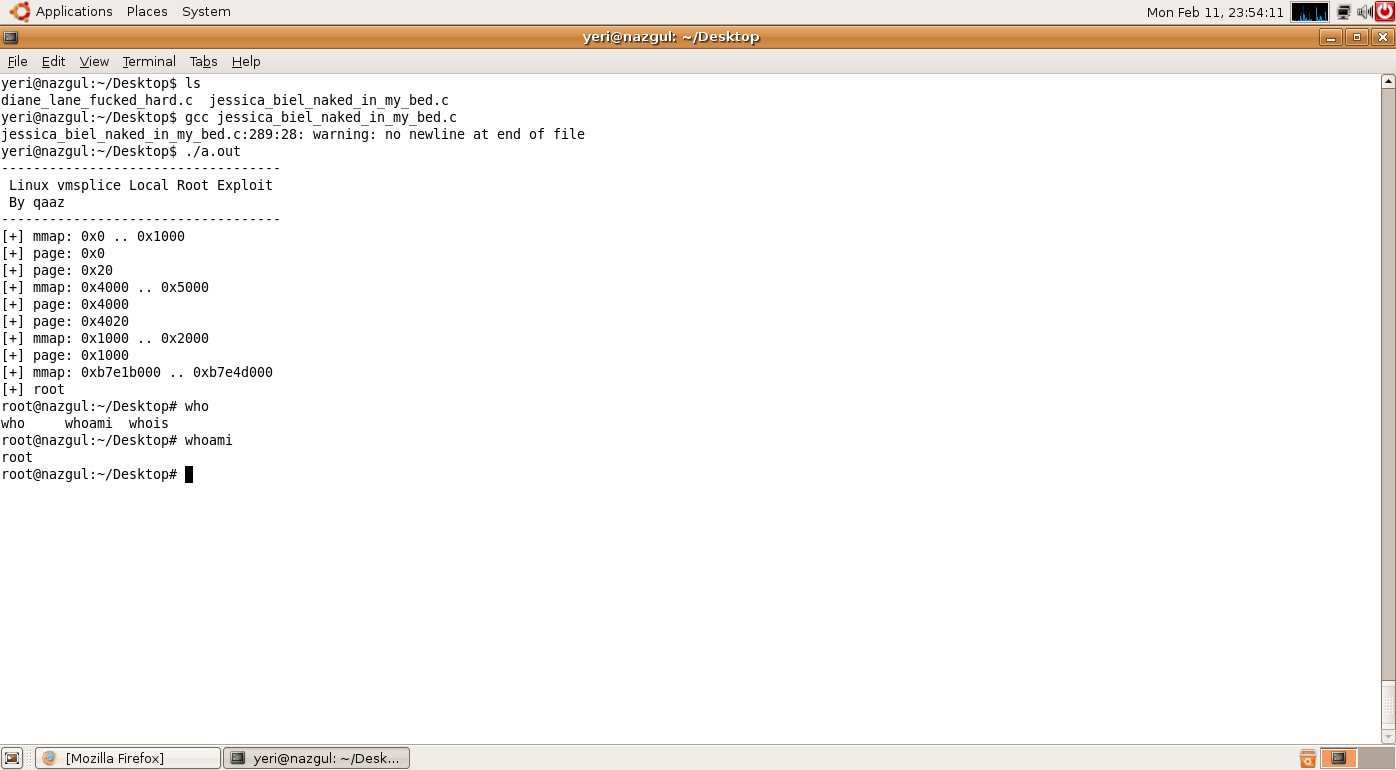
My-oh-my… I’m pretty sure this doesn’t require any more explanations ;)
EyeTV + ffmpegX = iMovie
EyeTV is a cool application that let’s you watch TV on your Mac. I happen to have the “lite” version, because it was significantly cheaper than the other version.
The cool thing is, you can easily record films or TV episodes with it, but with this version, there is no way to export it to a iMovie project, or to play the recording in a QuickTime based application.
When recording, it creates a folder “Live Recording - $date $time.eyetv”. And when double clicking it, it will open EyeTV.