
SlimmeLezer+
This is the foundation post for the rest of my Home Assistant energy series (if I ever get to it). Before I could automate around electricity, I obviously needed a (real-time) view of what’s actually flowing in and out.
Some context first
- I have solar panels (with a Huawei inverter installed by the previous owner)
- Smappee EV charger (bad purchase, it’s quite dumb and has a terrible UI and Home Assistant can’t control it),
- and I recently got 2x Marstek batteries (great hardware, cheap, and the worst software ever, truly terrible software. Oh and support started ghosting me after I lost my patience around Lunar New Year — they just will not reply to any of my help messages anymore).
- I drive a Polestar 4 (first edition, 2025)
note: the original Huawei inverter was dead when I moved in and likely never worked, don’t think the previous owners ever noticed & it got replaced under warranty after a lot of chasing and nagging Huawei directly. Rensol couldn’t move it forward and I basically asked to be cc’ed in the ticket and got my PA to chase Huawei with all het wrath. Great service from both Huawei and Rensol…
So that’s that… ;)
SlimmeLezer
… And more context.
I use a SlimmeLezer+ with my P1 port (Fluvius smart meter). As ESPHome has significantly changed since I got mine and it wouldn’t compile on a recent release, here’s my working config. ¯\(ツ)/¯
The SlimmeLezer used to be entirely powered by the P1 port but brownouts did happen; my initial config tried to limit memory and WiFi usage in an attempt to prevent these brownouts)… As this is no longer much of an issue (see below), I’ve stopped optimising that. But YMMV depending on your setup.
As the Marstek CT also uses the P1 port and I needed a splitter: I started off with a passive splitter but it was quite clear from the get-go that there were tons of issues (both meters were powered over P1). It’s been a while but I think roughly half the messages didn’t go through to SlimmeLezer (IIRC the message would just be forwarded across the two ports but would be too weak to be consistently read or something). I then got an active P1 splitter. As I only had one power plug available, I’d power either the splitter or the SlimmeLezer over a USB-C PSU… But what really fixed it and brought stability was doubling the power sockets: the splitter is powered over P1 power, both the SlimmeLezer and the Marstek CT have their dedicated power in via USB-C.
Honestly, I had a lot of issues with the Marstek CT, to the point they actually shipped me a replacement unit. In hindsight I don’t think it was broken, more a mix of crap software + P1 power issues + delayed/laggy Marstek dashboards + …
The setup, end to end
                ┌─────────────┐
                │ Solar panels│
                └──────┬──────┘
                       │ DC
                ┌──────┴──────┐
                │   Huawei    │── fusion_solar (cloud)
                │   inverter  │
                └──────┬──────┘
                       │ AC
        ───────────────┴───────────────  ← house AC bus
        │              │                │
  ┌─────┴──────┐ ┌─────┴──────┐  ┌──────┴────────┐
  │ Marstek    │ │ Fluvius P1 │  │ Smappee EV    │
  │ Venus E ×2 │ │ smart meter│  │ Wall + CTs    │
  │ (1× CT003) │ └─────┬──────┘  └──────┬────────┘
  └─────┬──────┘       │ RJ12, DSMR     │ (cloud; read-only)
        │ Modbus       │                │
        │ TCP   ┌──────┴──────┐         │
        │       │SlimmeLezer+ │         │
        │       └──────┬──────┘         │
        ▼              ▼                ▼
        ┌────────────────────────────────┐
        │       Home Assistant           │
        └────────────────────────────────┘
SlimmeLezer is fire-and-forget (at least as long as you don’t update ESPHome). Huawei is a cloud-poll. Marstek is local Modbus (but Modbus/battery BMS or firmware does crash and gets stuck. Restarting the integration sometimes fixes it). Smappee, cloud-only, can only read data (as opposed to telling it when to, for example, start/stop charging my EV).
Sensors
What you get out of it, sensor-wise:
sensor.slimmelezer_power_consumed — instantaneous import (kW)
sensor.slimmelezer_power_produced — instantaneous export (kW)
Per-phase power in / out
Per-phase voltage and current
Cumulative energy import + export per tariff
Gas consumption (if you have a gas meter on the same connector)
That’s all I need to know whether I’m paying or selling at any given moment.
The SlimmeLezer YAML
Stock Zuidwijk firmware with three small tweaks and a few changes to get it to compile on the latest ESPHome at the time of writing):
output_power: 14dBon the WiFi to fit inside the P1 250mA budget without rebooting (before getting an active splitter and dedicated power).rx_buffer_size: 1200on UART (down from default 1700). Belgian P1 telegrams are well under 1200 bytes; saves ~500 bytes of heap which the ESP8266 will thank you for.- A “Last Restart” and “Last Time Sync” template sensor so I can spot if the device has flatlined.
---
substitutions:
  device_name: slimmelezer
  timezone: "Europe/Brussels"
  domain: ".iot.internal"
  wifi_fast_connect: "false"

esphome:
  name: ${device_name}
  name_add_mac_suffix: false
  project:
    name: zuidwijk.slimmelezer
    version: "2.0"
  on_boot:
    then:
      - if:
          condition:
            lambda: return id(has_key);
          then:
            - lambda: |-
                std::string key(id(stored_decryption_key), 32);
                id(dsmr_instance).set_decryption_key(key.c_str());
          else:
            - logger.log:
                level: INFO
                format: "Not using decryption key. If you need to set a key use Home Assistant service 'ESPHome: ${device_name}_set_dsmr_key'"

esp8266:
  restore_from_flash: true
  board: d1_mini

mdns:
  disabled: false

wifi:
  ssid: !secret wifi_ssid
  password: !secret wifi_password
  fast_connect: "${wifi_fast_connect}"
  domain: "${domain}"
  # Powersaving for brownout due to 250mA restriction P1
  output_power: 14dB

logger:
  level: INFO
  baud_rate: 0

api:
  reboot_timeout: 15min
  encryption:
    key: !secret encryption_key_slimmelezer
  services:
    service: set_dsmr_key
    variables:
      private_key: string
    then:
      - logger.log:
          format: Setting private key %s. Set to empty string to disable
          args: [std::string(private_key).c_str()]
      - globals.set:
          id: has_key
          value: !lambda "return private_key.length() == 32;"
      - lambda: |-
          std::string pk_str(private_key);
          if (pk_str.length() == 32)
            pk_str.copy(id(stored_decryption_key), 32);
          id(dsmr_instance).set_decryption_key(pk_str.c_str());

ota:
  platform: esphome
  password: !secret ota_password
  on_error:
    then:
      - logger.log:
          format: "OTA update error %s"
          args: ["x"]

dashboard_import:
  package_import_url: github://zuidwijk/dsmr/slimmelezer.yaml@main
  import_full_config: true

time:
  - platform: homeassistant
    id: homeassistant_time
    timezone: "${timezone}"
    on_time_sync:
      then:
        - text_sensor.template.publish:
            id: last_time_sync
            state: !lambda 'return id(homeassistant_time).now().strftime("%Y-%m-%d %H:%M:%S");'
        - if:
            condition:
              lambda: 'return id(device_last_restart).state == "";'
            then:
              - text_sensor.template.publish:
                  id: device_last_restart
                  state: !lambda 'return id(homeassistant_time).now().strftime("%Y-%m-%d %H:%M:%S");'

globals:
  - id: has_key
    type: bool
    restore_value: yes
    initial_value: "false"
  - id: stored_decryption_key
    type: char[32]
    restore_value: yes

uart:
  baud_rate: 115200
  rx_pin: D7
  # Drop DSMR/UART buffers from 1700 → 1200 (Belgian P1 is fine at 1200; saves ~500–600 bytes).
  rx_buffer_size: 1200

dsmr:
  id: dsmr_instance
  max_telegram_length: 1200

sensor:
  - platform: dsmr
    energy_delivered_lux:
      name: "Energy Consumed Luxembourg"
    energy_delivered_tariff1:
      name: "Energy Consumed Tariff 1"
    energy_delivered_tariff2:
      name: "Energy Consumed Tariff 2"
    energy_returned_lux:
      name: "Energy Produced Luxembourg"
    energy_returned_tariff1:
      name: "Energy Produced Tariff 1"
    energy_returned_tariff2:
      name: "Energy Produced Tariff 2"
    power_delivered:
      name: "Power Consumed"
      accuracy_decimals: 3
    power_returned:
      name: "Power Produced"
      accuracy_decimals: 3
    electricity_failures:
      name: "Electricity Failures"
      icon: mdi:alert
    electricity_long_failures:
      name: "Long Electricity Failures"
      icon: mdi:alert
    voltage_l1:
      name: "Voltage Phase 1"
    voltage_l2:
      name: "Voltage Phase 2"
    voltage_l3:
      name: "Voltage Phase 3"
    current_l1:
      name: "Current Phase 1"
    current_l2:
      name: "Current Phase 2"
    current_l3:
      name: "Current Phase 3"
    power_delivered_l1:
      name: "Power Consumed Phase 1"
      accuracy_decimals: 3
    power_delivered_l2:
      name: "Power Consumed Phase 2"
      accuracy_decimals: 3
    power_delivered_l3:
      name: "Power Consumed Phase 3"
      accuracy_decimals: 3
    power_returned_l1:
      name: "Power Produced Phase 1"
      accuracy_decimals: 3
    power_returned_l2:
      name: "Power Produced Phase 2"
      accuracy_decimals: 3
    power_returned_l3:
      name: "Power Produced Phase 3"
      accuracy_decimals: 3
    gas_delivered:
      name: "Gas Consumed"
    gas_delivered_be:
      name: "Gas Consumed Belgium"
  - platform: uptime
    name: "SlimmeLezer Uptime"
  - platform: wifi_signal
    name: "SlimmeLezer Wi-Fi Signal"
    update_interval: 60s
  - platform: template
    name: "Free Heap"
    lambda: |-
      return (float)system_get_free_heap_size();
    unit_of_measurement: "bytes"
    accuracy_decimals: 0
    entity_category: diagnostic
    icon: "mdi:memory"

text_sensor:
  - platform: dsmr
    identification:
      name: "DSMR Identification"
    p1_version:
      name: "DSMR Version"
    p1_version_be:
      name: "DSMR Version Belgium"
  - platform: wifi_info
    ip_address:
      name: "SlimmeLezer IP Address"
    ssid:
      name: "SlimmeLezer Wi-Fi SSID"
    bssid:
      name: "SlimmeLezer Wi-Fi BSSID"
  - platform: version
    name: "ESPHome Version"
    hide_timestamp: true
  - platform: template
    name: 'Last Restart'
    id: device_last_restart
    icon: mdi:timeline-clock
    entity_category: diagnostic
  - platform: template
    name: "Last Time Sync"
    id: last_time_sync
    icon: mdi:clock
    entity_category: diagnostic
Drop that into ESPHome, set your WiFi/encryption secrets, flash, and the device will appear in HA’s ESPHome integration with all the sensors above.
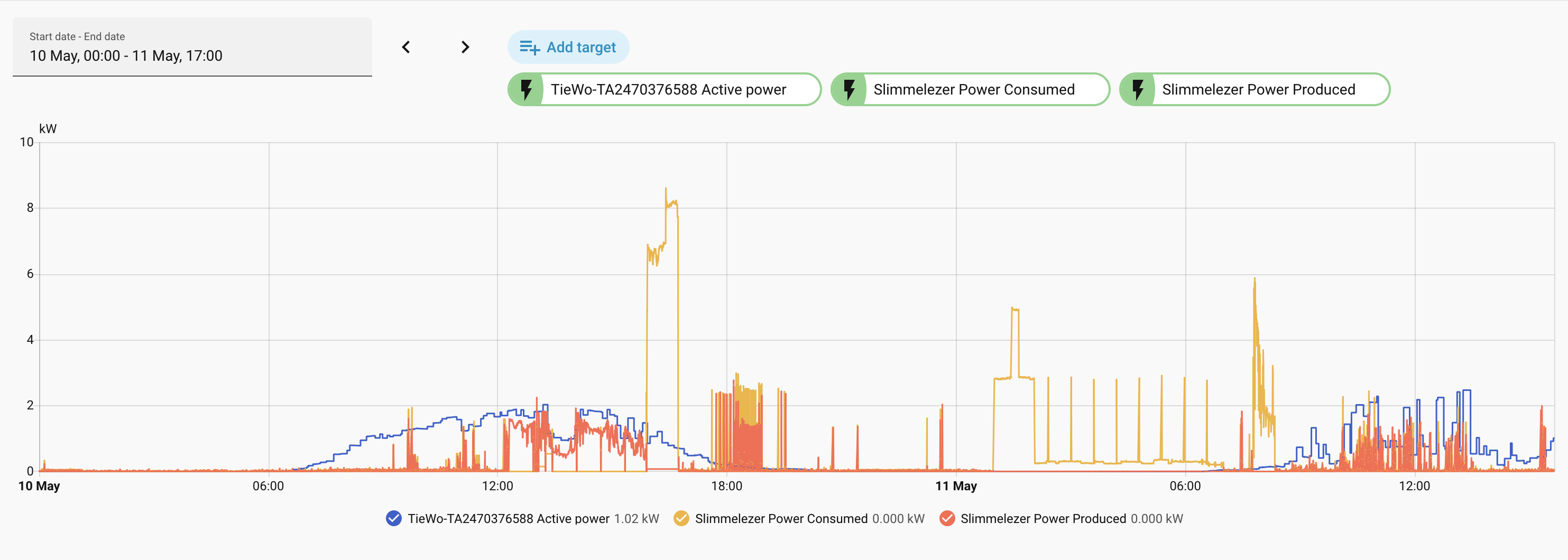
I’m very happy with the SlimmeLezer+ and got my parents one too.