Display iPhone battery status in percent
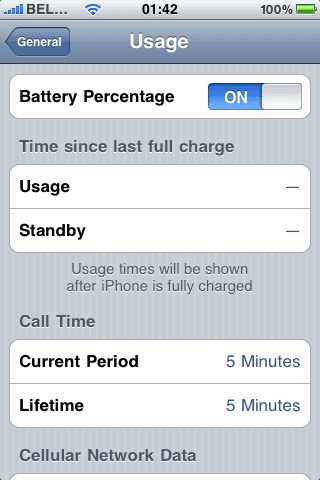
With the new firmware, you can now display your battery status in percent (%).
For my iPhone 3G this came, out of the box, right after the update to 3.0. I could clearly see the 100% next to my battery icon.
But yes, I did have my iPhone jailbroken before I upgraded.
Now, appearantly, this feature is only available for iPhone 3GS, and not iPhone 3G and iPhone 2G, though, it is possible using e.g. Bossprefs. Lame from Apple !
Anyhow, after some Googling, I came to the conclusion:
- iPhones that used to be jailbroken will have the % displayed next to the battery icon.
- Regular iPhone 2G and 3G will not have the switch in "Settings > General > Usage", whereas 3GS will.
I found a cool workaround right here, although it requires you to jailbreak your iPhone.
Don’t forget to install “openssh” and “wget” or “lynx” (makes it a lot easier) using the Cydia package manager.
I’ve hosted the plist file right here, just in case it would go offline.
Basicly, you have to add these 2 lines to the .plist:
   <key>gas-gauge-battery</key>
   <true/>
This works with the current iPhone version (3.0).