Software

231 posts in Software

Turning off Driver Signing in Windows 7

· errors, software

To disable it, as administrator, open cmd.exe (win button + R -> cmd -> [enter]), and copy paste the following 2 lines:

bcdedit.exe -set loadoptions DDISABLE_INTEGRITY_CHECKS bcdedit.exe -set TESTSIGNING ON

Reboot, enjoy. No more annoying messages. :)

Fraps to iMovie

· apple, software, windows

How to successfully import a movie recorded using Fraps into iMovie;

  1. Get Fraps, record whatever you want
  2. Get XviD4PSP (freeware) & install
  3. Import your avi files recorded using Fraps into XviD4PSP (drag & drop)
  4. Pick the encoding you want on the left. x264 q21 DXVA-SD-Insane seemed to be an acceptable quality.
  5. Click enqueue (and repeat 3->5 for multiple files)
  6. Click encode
  7. ... wait ...
  8. This will create .mp4 files; transfer those to your Mac
  9. Open iMovie, File -> Import -> Movies -> select the mp4 files
  10. ... wait ... A couple of hours
  11. Your movie should now be in iMovie, and you should be able to edit it
  12. Edit whatever you want to edit, share and export and have fun.
A little hint, if your video is cropped (parts cut off), click your movie sequence -> on the left corner of your sequence a little "gear" will appear -> Cropping & Rotation -> in your right display window click "fit" to make it full size.

Took me quite some time before I managed to do it, but hey, now I know… ;)

iTunes 9 and iPhone OS 3

· apple, errors, software

And the smart playlist syncing issue.

Syncing smart playlists, with “live updating” checked, bugged the playlists on the iPhone (there were songs in the playlist that didn’t belong there). Hoping this bug would be fixed ASAP I tried to ignore it as long as possible… However, it so far hasn’t been fixed.

As I was pretty fed up with unchecking “live updating” for 6 playlists eachtime I synced my iPhone, I tried to play around and find a fix.

MRTG

· hardware, misc, networking, software, www

As I often have people asking for the files I use to make my pretty MRTG graphs; I’ll publish them here.

Here are some examples:

Zero - One - Four - vm1 - Sauron

The config files:

Sauron (including Squid stats),

Zero (including fan stats).

List of files included:

  • indexmaker; simple script (included with MRTG) to generate a simple index file with all the graphs
  • snmp-if.sh; will show you the IDs of the interfaces on the server/pc. These IDs have to be edited in the mrtg.cfg file; e.g.:

Target[eth0]: 2:public@localhost:

Hamachi: Failed to connect to the engine

· errors, software, windows

After getting the Hamachi 2 update (without a prior notice, nicely done… No more auto update if they continue to break stuff) I started to notice a bunch of XPs receiving this error after a reboot: Failed to connect to the engine.

Hamachi is auto started, at boot, because we have a shortcut in the startup folder. No other way to auto start the free version (as far as I know).

HP ProtectTools and Windows 7

· errors, hardware, software, windows

If you’re having troubles using HP ProtectTools and Windows 7, you’ll probably using an outdated version of ProtectTools. Eventhough HP tells you this is the latest version for your notebook.

A simple fix, is to download the latest version, which is model independent.

Be sure to completely uninstall the previous version, reboot, and reinstall the latest version. I can now successfully login using the biometric fingerprint device.

Gmail spam "mark-as-read"

· software

Google changed their Mailbox names (from Google Mail, to Gmail) so here is the update from my previous php script I made a few years ago.

Edit: Gmail reverted back to the previous version (imap folders were “Google Mail”, changed to “Gmail” yesterday and today). To version v0.03 won’t work anymore. I’m guessing this was a temporary change to implement their exchange/push-support.

Prowl: check server status (using ping)

· apple, linux, networking, software

Yesterday I’ve start using Prowl, as I heard good comments about it. And one of the things I want it to check, are my server statuses. I made a quick script using bash and crontab to check every 10 min if it replies on ping. Per server, I created “host.domain.tld.sh” (e.g. zero.rootspirit.com.sh), and added this in the file:

#!/bin/bash
KEY=YourApiKey
HOST=zero.rootspirit.com
ping -c 1 $HOST   &>/dev/null
if [ $? -ne 0 ] ; then
curl -k -s "https://prowl.weks.net/publicapi/add?apikey=$KEY&application=Server%20Connectivity%20Failure&event=&description=$HOST&priority=2"
fi

Of course, change KEY to your API key, HOST to the IP or DNS of the server it should ping. Also, make sure, that when pinging on your host where you’ll run the bash script on, a non-existing domain actually returns:

Display iPhone battery status in percent

· software

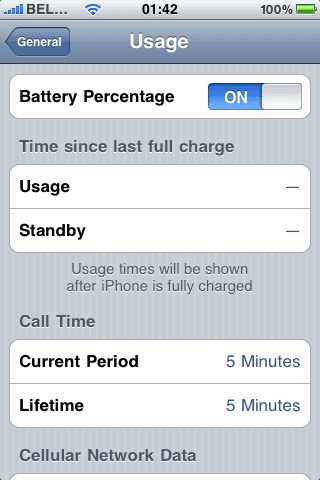
With the new firmware, you can now display your battery status in percent (%).

For my iPhone 3G this came, out of the box, right after the update to 3.0. I could clearly see the 100% next to my battery icon.

But yes, I did have my iPhone jailbroken before I upgraded.

Now, appearantly, this feature is only available for iPhone 3GS, and not iPhone 3G and iPhone 2G, though, it is possible using e.g. Bossprefs. Lame from Apple !

Anyhow, after some Googling, I came to the conclusion:

  • iPhones that used to be jailbroken will have the % displayed next to the battery icon.
  • Regular iPhone 2G and 3G will not have the switch in "Settings > General > Usage", whereas 3GS will.
iPhone battery % status

I found a cool workaround right here, although it requires you to jailbreak your iPhone.

Don’t forget to install “openssh”  and “wget” or “lynx” (makes it a lot easier) using the Cydia package manager.

I’ve hosted the plist file right here, just in case it would go offline.

Basicly, you have to add these 2 lines to the .plist:

   <key>gas-gauge-battery</key>
   <true/>

This works with the current iPhone version (3.0).