Software

231 posts in Software

Fixing GrowlMail with Mac OS X 10.6.7 and Mail 4.5

· apple, errors, software

Add following two lines to Info.plist:

<string>9049EF7D-5873-4F54-A447-51D722009310</string>
<string>1C58722D-AFBD-464E-81BB-0E05C108BE06</string>

Between

<key>SupportedPluginCompatibilityUUIDs</key>
<array>

And

</array>

You can find the Info.plist in:

~/Library/Mail/Bundles/GrowlMail.mailbundle/Contents/

Or

Great Firewall checker

· linux, networking, software, www

An attempt to create a list of major blocked sites in China (or any other country/ISP). It’s written entirely in Bash.

Github repo riiiiiiight here. It’s used by my PAC-generator.

The Github page is updated once a day by three hosts. One in Belgium, one in The Netherlands, and a Guruplug in China. This way you can compare the results (in case some are down or replying slowly).

As it’s impossible to test every possible site, I just check popular sites (and a bunch of sites from Alexa). But if you know blocked sites not in the list, please submit them – thanks!

Proxy.pac generator

· linux, networking, software, www

I made a simple bash script that generates a proxy auto configuration file.

The PAC file generated redirects all matching rules through the proxy.

The only issue at the moment, is that, once the list gets big, it’s not very performance-friendly. Something I’ll try to fix in the coming days.

I’m using this script to generate a proxy.pac file at work to redirect blocked content in China through the proxy for our employees currently in China.

Compile wget on Mac OS X

· apple, software, www

There's a precompiled wget available on the net, but it's not automatically accepting StartSSL's certificates. And as it seems, there's a wget update available that did.

This is what I had to do to compile it on my Macbook Pro;

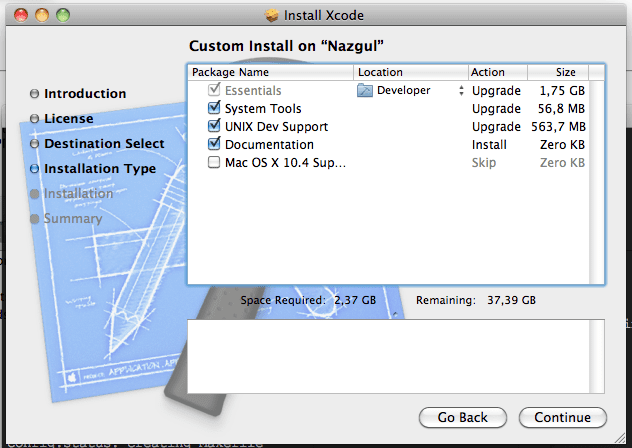
  • Install Xcode, if you haven't, and be sure to select UNIX Dev Support.

Or you'll get this error:

configure: error: C compiler cannot create executables
  • Export Xcode's gcc PATH:
PATH=/Developer/usr/bin/:$PATH
  • Download wget
  • In Terminal: untar it
tar xvzf wget-latest.*
  • And compile it
cd wget directory
./configure
make
sudo make install
  • In case you had an old (precompiled) wget installed;
    remove that version first (/usr/bin/wget probably).
    By default, this one will install itself in /usr/local/bin/wget which should be in your $PATH as well (in case it's not, make a symlink from the old /usr/bin/wget to /usr/local/bin/wget, or recompile with other installation directories).

Dropbox & Debian

· linux, software

Dropbox has been removed from the Debian package list due to licensing issues.

However, there’s still a way to download and install Dropbox on your Debian box without attempting to compile the source code.

Head over to Linux Mint and download both Dropbox (version 1.0.1) and Nautilus-Dropbox (version 0.6.7-lmde > i386 or amd64).

run:

dpkg -i nautilus-dropbox*
dpkg -i dropbox.*

as root. Then return to your regular user and start dropbox

Bind mrtg stats

· linux, software, www

Because I couldn’t find any that worked.
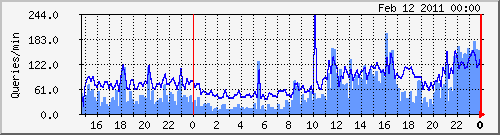
(Dark blue: incoming queries, light blue: outgoing/recursive lookups)

mrtg.cfg sample:
# Bind
Title[bind]: Bind Queries
Target[bind]: `/etc/mrtg/bind-stats.sh`
PageTop[bind]: <H1> Bind queries per minute on vm1 </H1>
Options[bind]: growright,pngdate,nobanner,gauge,nopercent,noinfo
MaxBytes[bind]: 50000
Ylegend[bind]: Queries/min
ShortLegend[bind]:  queries/min
LegendO[bind]: Incoming Bind queries per minute
LegendI[bind]: Outcoing Bind queries per minute
Legend2[bind]: Incoming Bind queries per minute
Legend1[bind]: Outcoing Bind queries per minute
bind-stats.sh:
#!/bin/bash
# Bind MRTG stats
# by Yeri Tiete (Tuinslak) - 10/02/2011
# https://yeri.be
#
# mrtg.cfg sample:
################################################################################
#	#
#	# Bind
#	#
#	Title[bind]: Bind Queries
#	Target[bind]: `/etc/mrtg/bind-stats.sh`
#	PageTop[bind]: <H1> Bind queries per minute on vm1 </H1>
#	Options[bind]: growright,pngdate,nobanner,gauge,nopercent,noinfo
#	MaxBytes[bind]: 50000
#	Ylegend[bind]: Queries/min
#	ShortLegend[bind]:  queries/min
#	LegendO[bind]: Incoming Bind queries per minute
#	LegendI[bind]: Outcoing Bind queries per minute
#	Legend2[bind]: Incoming Bind queries per minute
#	Legend1[bind]: Outcoing Bind queries per minute
################################################################################

file path of named.stats

FILE=/var/log/named.stats TMPFILE=/tmp/__dnsstats.txt
Call to undefined function http_post_data()

· errors, linux, software, www

After updating my server from testing to Squeeze it suddenly crashed after running a high CPU % perl script.

Being unresponsive I reset the machine to reboot it.

After booting up and testing websites running on it I came along an odd PHP error;

Call to undefined function http_post_data()

Probably due to PHP updates from Lenny/testing to Squeeze.

Squid MRTG stats

· hardware, linux, misc, networking, software, www

I talked about MRTG stats for Squid in the past but apparently forgot to include the .mib file.

So, here it is. Download this file and put it in /usr/share/squid/mib.txt.

I don’t quite remember where I found that mib file. Probably included with Squid on Gentoo or the world wide web… But I couldn’t find it on Debian, so here it is. And be sure to add these lines to your Squid config:

Debian MySQL Gem file error

· errors, linux, software

When installing the MySQL Gem, I had this error:

Building native extensions.  This could take a while...
ERROR:  Error installing mysql:
ERROR: Failed to build gem native extension.
/usr/bin/ruby1.8 extconf.rb --with-mysql-dir=/usr/include/mysql
checking for mysql_query() in -lmysqlclient... no
checking for main() in -lm... yes
checking for mysql_query() in -lmysqlclient... no
checking for main() in -lz... yes
checking for mysql_query() in -lmysqlclient... no
checking for main() in -lsocket... no
checking for mysql_query() in -lmysqlclient... no
checking for main() in -lnsl... yes
checking for mysql_query() in -lmysqlclient... no
checking for main() in -lmygcc... no
checking for mysql_query() in -lmysqlclient... no
*** extconf.rb failed ***
Could not create Makefile due to some reason, probably lack of
necessary libraries and/or headers.  Check the mkmf.log file for more
details.  You may need configuration options.
Provided configuration options:
--with-opt-dir
--without-opt-dir
--with-opt-include
--without-opt-include=${opt-dir}/include
--with-opt-lib
--without-opt-lib=${opt-dir}/lib
--with-make-prog
--without-make-prog
--srcdir=.
--curdir
--ruby=/usr/bin/ruby1.8
--with-mysql-config
--without-mysql-config
--with-mysql-dir
--with-mysql-include
--without-mysql-include=${mysql-dir}/include
--with-mysql-lib
--without-mysql-lib=${mysql-dir}/lib
--with-mysqlclientlib
--without-mysqlclientlib
--with-mlib
--without-mlib
--with-mysqlclientlib
--without-mysqlclientlib
--with-zlib
--without-zlib
--with-mysqlclientlib
--without-mysqlclientlib
--with-socketlib
--without-socketlib
--with-mysqlclientlib
--without-mysqlclientlib
--with-nsllib
--without-nsllib
--with-mysqlclientlib
--without-mysqlclientlib
--with-mygcclib
--without-mygcclib
--with-mysqlclientlib
--without-mysqlclientlib
Gem files will remain installed in /usr/lib/ruby/gems/1.8/gems/mysql-2.8.1 for inspection.
Results logged to /usr/lib/ruby/gems/1.8/gems/mysql-2.8.1/ext/mysql_api/gem_make.out

Can be solved by installing libmysqlclient15-dev